
A client launches a new product on Friday. By Monday, you're looking at a storage bucket that anyone can list, a router that still accepts admin/admin, and a debug route the developers swore they'd removed. None of those needed a clever exploit. An attacker only had to ask.
That's why security misconfiguration examples show up so reliably in penetration testing. The setting was wrong, the default was left on, or the permission was broader than anyone intended. It's often the cheapest path in because there's nothing to break. You connect, you log in, or you read the file the server happily offers.
The scale isn't anecdotal. The OWASP 2025 Top 10 for security misconfiguration ranked this category second, up from fifth in 2021, and reported that 100% of the applications tested had at least one form of misconfiguration. That doesn't mean every issue is critical. It means you should assume you'll find something, then prove what it allows.
This catalogue treats each example as a testable finding, not a theory. For each one you'll get what to check, what evidence to capture, what to recommend, and which compliance control it maps to. That structure matters for MSSPs and consultancies because clients don't fix vague warnings. They fix a screenshot, a policy statement, and a named owner.
It also helps to see misconfiguration as part of your wider exposure work, not a once a year scan. If you're building that practice, attack surface management for MSPs is a useful frame for keeping newly exposed assets in view between formal tests. Start with the ten checks below, verify each one read only where you can, and write the finding so another tester could reproduce it exactly.
Table of Contents
- 1. Default Credentials on Administrative Interfaces
- 2. Publicly Accessible Cloud Storage Buckets
- 3. Overly Permissive Cloud IAM Roles and Instance Metadata Exposure
- 4. Unauthenticated Databases and Search Clusters Exposed to the Internet
- 5. Unauthenticated Kubernetes API Servers and Management Dashboards
- 6. Exposed Framework Debug and Management Endpoints
- 7. Verbose Error Messages and Stack Traces
- 8. Directory Listing and Exposed Version Control Folders
- 9. Permissive CORS Configuration
- 10. Legacy Protocol and Weak TLS Configuration
- How the 10 security misconfiguration examples compare by exposure, testing approach, and compliance mapping
- Turning Misconfiguration Findings Into Repeatable Client Results
1. Default Credentials on Administrative Interfaces
Fingerprint the service before you try a single password. A router login, a database console, and an IoT camera don't lock out the same way, and spraying blindly can disable the account you're trying to prove is weak. Identify the vendor and model from banners, page titles, or favicons, then try only that vendor's known defaults.
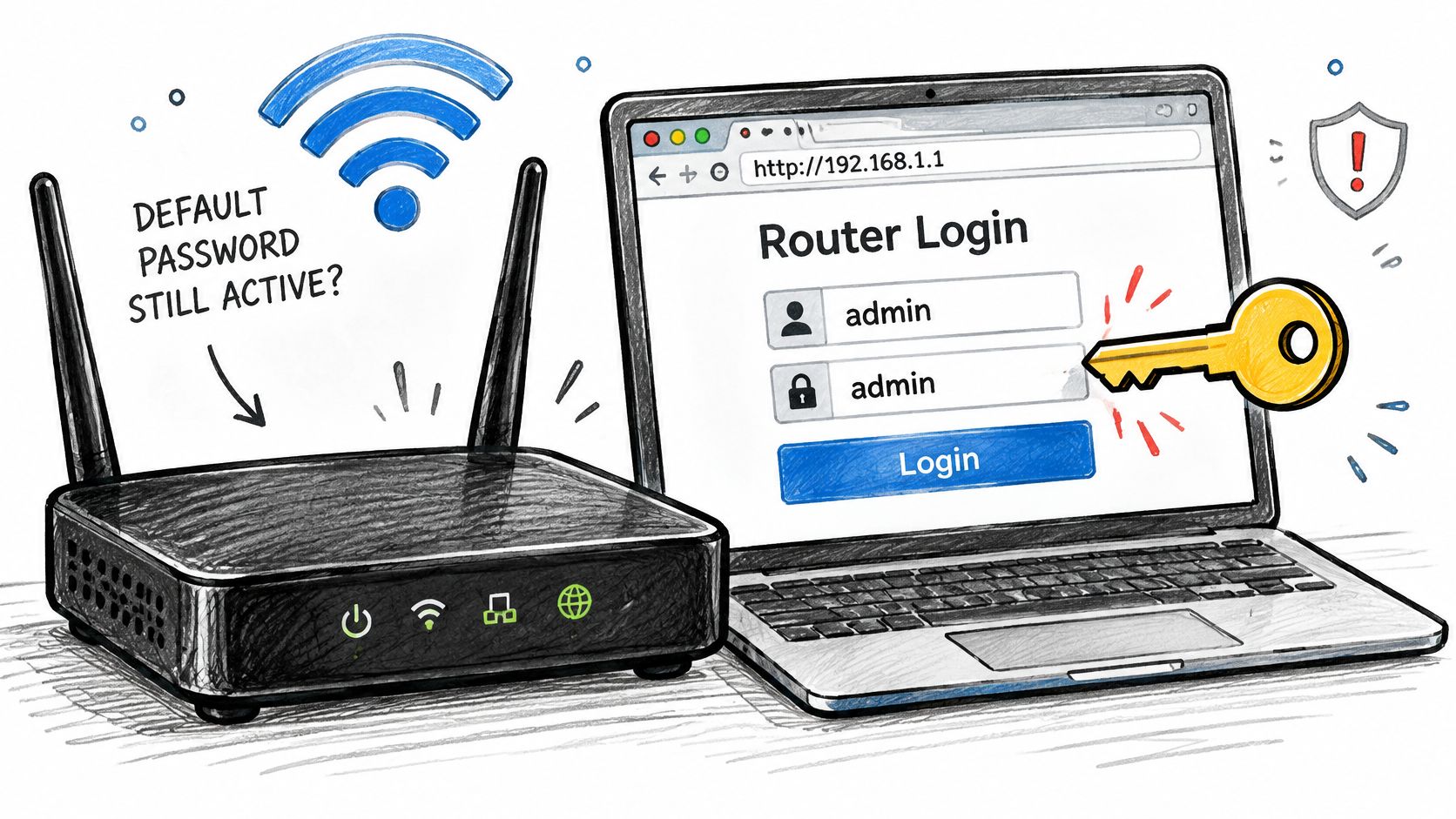
The 2016 Mirai botnet is still the clearest warning. It logged into large numbers of IoT cameras and routers with hard-coded or default credentials, then used them in DDoS attacks, including the October 2016 attack on DNS provider Dyn. Pentests keep finding the same pattern on network management consoles left unchanged during rollout.
CISA Cybersecurity Performance Goals 2.0 recommend an organization wide policy requiring default manufacturer passwords to be changed for all hardware, software, and firmware before systems connect to a network. That gives you a clean test condition. Was the device reachable before the credential was changed, and what did the login allow?
How to prove it
- Record the win: Capture the successful login, privilege level, and a screenshot showing an administrative function, not just a login page.
- Limit the spray: Use a small per vendor wordlist and stop after success. Note lockout behavior if it triggers.
- Map it: Tie the finding to PCI DSS Requirement 2.2 and ISO 27001:2022 control 8.9.
Recommend forced password change on first use, unique per device credentials, and removal of unused default accounts. I use ThreatExploit AI's verification step here to confirm each credential hit, because a login page that returns 200 isn't proof of access. Testable takeaway. A default credential finding isn't closed until a retest shows the old password fails and MFA or a forced change blocks reuse.
2. Publicly Accessible Cloud Storage Buckets
A storage bucket can expose data even when its contents do not appear in a public listing. Test list, read, and write permissions separately. A bucket that blocks listing may still serve a known object, and anonymous write access requires a different fix from public read access.
Amazon S3, Azure Blob Storage, and Google Cloud Storage can all be exposed by permissive policies, public ACLs, or misunderstood access grants. Misconfigured storage buckets have repeatedly exposed customer records at large companies. The finding is the specific permission that lets an unauthorized user reach the data.
For S3, an “authenticated users” grant can include anyone with an AWS account, not just users in the client's account. Test with an external account you control, then record which principal succeeded. Use this cloud storage security checklist to check for related exposure paths.
Capture the exact policy statement or ACL, a listing or one redacted object, and the number of objects visible. Do not download a dataset to prove access. Recommend account-level Block Public Access, with exceptions managed through reviewed infrastructure as code. Map personal data exposure to SOC 2 CC6.1 and GDPR Article 32. ThreatExploit AI reports can include those control references alongside the evidence.
Practical rule: A listing, response headers, and one redacted sample can prove exposure without creating another copy of sensitive data.
Testable takeaway. After the policy change, retest anonymous and external authenticated access. Include the before-and-after policy diff in the report.
3. Overly Permissive Cloud IAM Roles and Instance Metadata Exposure
One SSRF flaw rarely explains a breach on its own. Test the chain. Can the application reach the instance metadata service, does that service require a session token, and what can the attached role do once you have its temporary credentials?
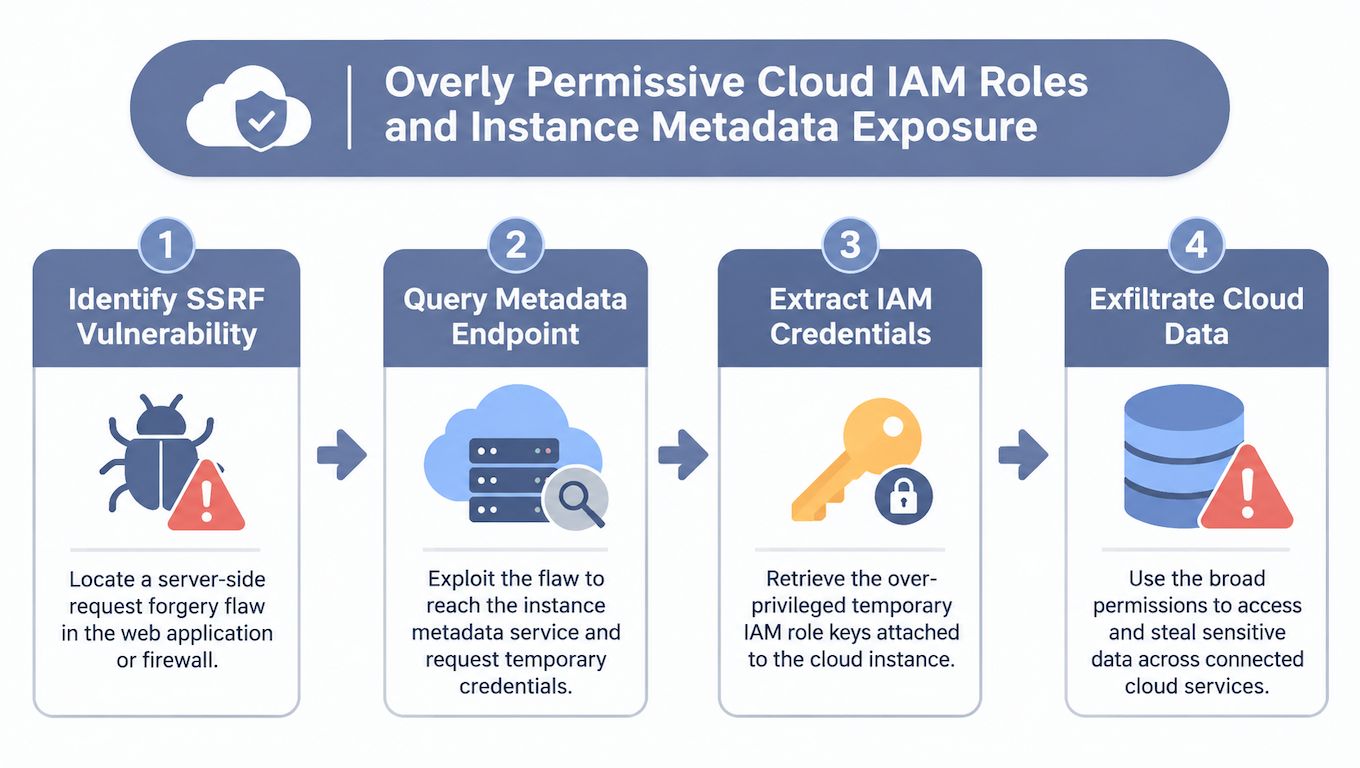
The Capital One breach account from CERT-EU describes an externally reachable web application firewall vulnerable to SSRF, access to AWS Instance Metadata Service v1, and an over privileged IAM role that could enumerate and read numerous S3 buckets. Data associated with approximately 100 million U.S. individuals and 6 million Canadians was accessed. Fixing only the SSRF would've left the authorization failure intact.
Test the blast radius, not just the bug
Check whether IMDSv2 with session tokens is enforced and whether a hop limit stops requests forwarded through containers or proxies. Then enumerate the role's effective permissions and flag wildcard actions or resources. A WAF role that can read customer buckets is the finding, even if your SSRF proof is limited.
Document each step with timestamps, the metadata response with secrets redacted, and one harmless API call that proves scope, such as listing bucket names without reading objects. Recommend least privilege per resource, blocking unnecessary metadata access, and alerting when infrastructure roles touch data services. ThreatExploit AI's cloud testing coverage for AWS, Azure, and GCP helps check identity and metadata settings together rather than as separate low findings.
Testable takeaway. The chain is broken only when IMDSv1 fails, the role can't reach unrelated data, and anomalous credential use raises an alert.
4. Unauthenticated Databases and Search Clusters Exposed to the Internet
You don't need credentials when the database never asks for them. MongoDB, Elasticsearch, Redis, and CouchDB still appear on public IPs bound to all interfaces, and internet wide scanners find them faster than most asset inventories update.

In 2017, attackers wiped and held for ransom tens of thousands of MongoDB instances with no authentication enabled, a campaign documented by researchers including Victor Gevers. Elasticsearch is the modern equivalent in many external tests. An unauthenticated request returns cluster health, index names, document counts, and sometimes full records.
Prove exposure with a read only query. List databases or indexes, capture counts and index names, and take one redacted sample only if the rules of engagement allow it. Don't test delete or write on production data. If you need to prove write access, agree a harmless canary record in advance.
What to check together
- Bind address: Is the service listening on 0.0.0.0 instead of localhost or a private subnet?
- Authentication and TLS: Are both disabled, or is one compensating for the other?
- Network path: Do firewall and security group rules reach the service from outside?
Recommend private networking first, then authentication, TLS, and verified backups. Network segmentation buys protection even if a future deploy resets the auth flag. I use ThreatExploit AI's Nmap driven reconnaissance and evidence capture here because consistent service fingerprints make retests defensible. Testable takeaway. From an external host, the port should be unreachable. From an allowed host, unauthenticated queries should fail.
5. Unauthenticated Kubernetes API Servers and Management Dashboards
An exposed Kubernetes endpoint can disclose workloads or grant access to cluster resources before anyone presents a named identity. Start by sending unauthenticated requests to the API server and kubelet endpoints. If anonymous access can list pods or read a dashboard, record that exposure before reviewing permissions for authenticated roles.
Researchers have repeatedly found Kubernetes administrative consoles without passwords and abused them to run cryptocurrency miners inside clusters. Similar configuration failures include a read-only kubelet port reachable from the wrong network, a dashboard exposed through a public load balancer, or a dashboard bound to an overprivileged service account.
Test each surface separately. The API server governs cluster access, the kubelet exposes node-level operations, and a dashboard inherits its service account's permissions. Capture the endpoint, request, response code, and object types returned. Pod names can reveal application architecture; access to secrets provides direct evidence of credential exposure. Redact secret values in screenshots and logs.
Review RBAC bindings and identify by name any binding that grants cluster-admin privileges to a default service account. If permissions are managed through manifests or Terraform, compare the live configuration with the infrastructure as code security review to prevent a later deployment from restoring the risky binding.
Recommend disabling anonymous authentication, limiting dashboards to internal access with login required, and rotating any exposed service account tokens. Map the finding to the relevant CIS Kubernetes Benchmark control and the applicable SOC 2 or ISO 27001 controls. Testable takeaway: anonymous requests should receive an authorization failure, and a namespace-scoped token should not list secrets outside its namespace. Capture both responses as evidence.
6. Exposed Framework Debug and Management Endpoints
A Spring Boot app can pass every injection test and still hand you its database password at /actuator/env. Debug and management endpoints are built for developers. In production they're an inventory of secrets, routes, and sometimes code execution.
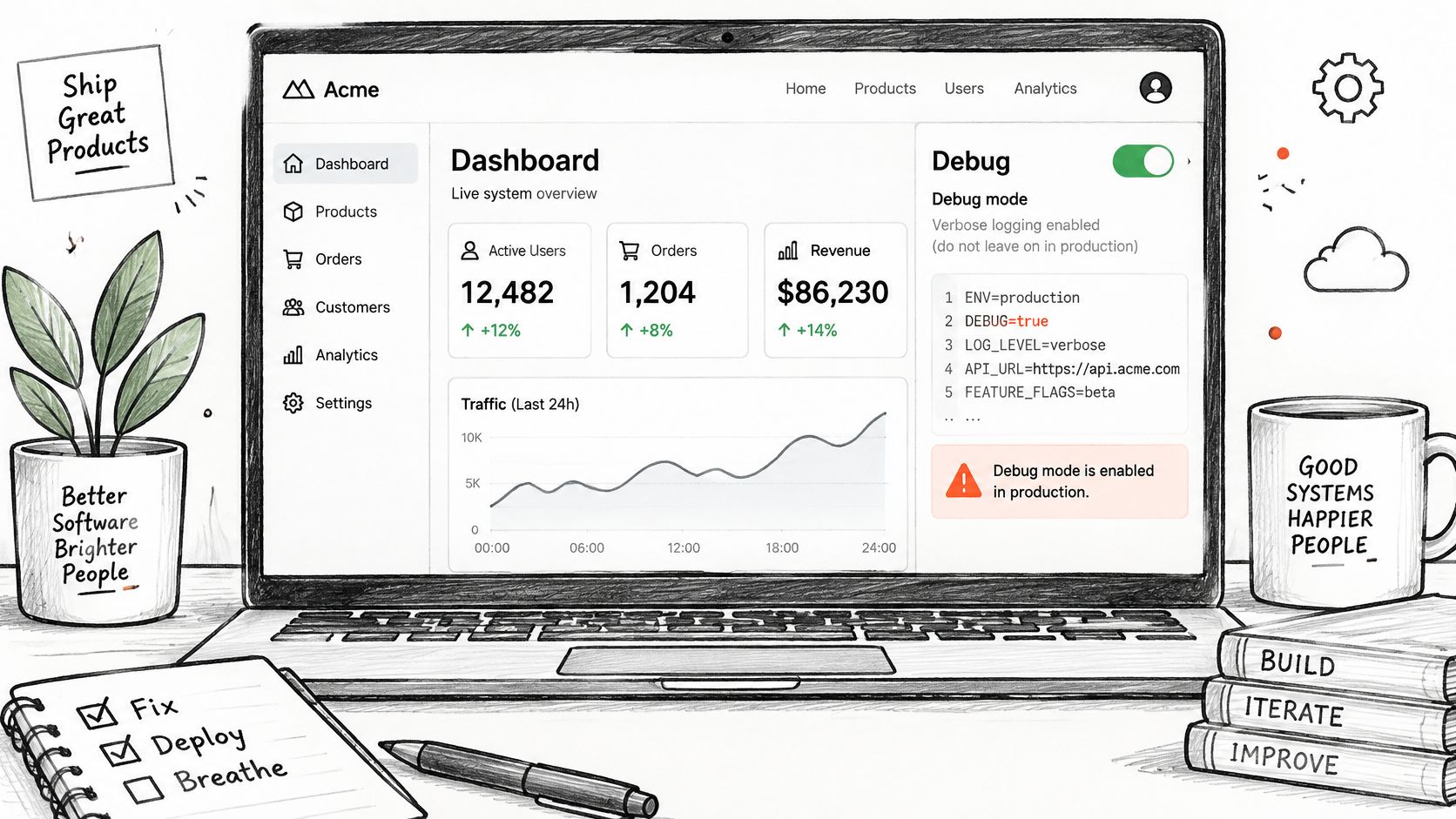
Pentests frequently find actuator endpoints on public interfaces revealing environment properties with database passwords and API keys. Werkzeug and similar debug consoles left enabled in production are worse. When the console PIN can be obtained or bypassed, the finding moves from disclosure to remote code execution.
Enumerate management paths for the framework you've fingerprinted, not a generic wordlist for everything. Check /actuator/env, /heapdump, and /jolokia on Spring Boot, debug consoles on Python frameworks, and profiling routes on others. Confirm what returns without authentication and redact secrets in your evidence while preserving enough context to prove they're real.
Avoid triggering heap dumps on a busy production service. They can be large, slow, and full of live session data you don't need. A read only env or health response that shows the endpoint family is open usually proves the point, and you can state heapdump risk without pulling one.
Recommend disabling debug mode in production builds and moving management endpoints to an internal network or separate authenticated port. ThreatExploit AI's web and API testing covers REST and GraphQL endpoints, and I flag debug routes in the executive summary because owners understand production debug mode instantly. Testable takeaway. External requests to management paths should return 404 or a login challenge, never configuration data.
7. Verbose Error Messages and Stack Traces
Send the application something it doesn't expect. A quote in a numeric field, a very long string, a negative quantity, or JSON where form data belongs will often produce the error the developers see locally. If that error reaches the browser intact, you've got free reconnaissance.
SQL syntax errors returned directly to users reveal the database engine and sometimes table or column names. Stack traces expose class paths, file locations, and dependency versions that map cleanly to known CVEs. On its own this is often rated low. As an accelerator for injection or component exploitation, it saves an attacker hours.
Rate it carefully. I separate disclosure only findings from cases where the error output directly enabled another attack, and I show that link in the report. A generic 500 page with a version header isn't the same risk as a trace that prints a connection string. Lumping them together trains clients to ignore both.
Evidence that makes a low finding land
Capture the malformed request, the full response with secrets redacted, and a normal response for comparison. Name what the output reveals and what you'd do next with it. That second sentence is what turns housekeeping into a fix.
Recommend generic error pages for users, detailed errors only in internal logs, and removal of server version headers. Map the finding to PCI DSS Requirement 6.2 and OWASP error handling guidance. OWASP's earlier benchmark is instructive here. The OWASP 2021 Top 10 security misconfiguration category covered overly detailed error messages and reported 90% of applications were tested for some form of misconfiguration, with an average incidence rate of 4.51%. Testable takeaway. The same malformed input should return a generic message and a correlation ID, with detail only in server logs.
8. Directory Listing and Exposed Version Control Folders
An exposed .git folder is not a minor information leak. With open source tooling, an attacker can reconstruct the repository, read commit history, and pull credentials that were removed from current code but never rotated. Researchers have documented many large websites making exactly this mistake.
Check for .git, .svn, backup archives, and editor files during content discovery on every web root, including staging hostnames and old virtual hosts. Directory listing matters for the same reason. An index of an uploads or backups folder lets an attacker browse filenames you'd never link publicly.
Confirm retrieval with minimal requests. Fetching .git/HEAD or .git/config proves exposure without mirroring the whole repository onto your test machine. If the engagement allows deeper proof, recover one sensitive file name or a redacted secret and stop. Your report should list which secrets were recoverable by type and location, because rotation is the urgent fix, not just blocking the path.
Blocking /.git/ at the web server is only half the remediation. Any credential that was ever in that repository must be treated as public and rotated, even if access logs look quiet.
Recommend excluding version control folders from deployment artifacts, disabling directory indexing, and blocking backup extensions such as .bak, .zip, and .sql at the server level. Automated Nuclei template checks in ThreatExploit AI workflows catch these paths consistently across client environments, including the forgotten subdomain a manual test might skip. Testable takeaway. Requests for version control and backup paths return 403 or 404 on every host, and previously exposed secrets no longer work.
9. Permissive CORS Configuration
CORS findings live or die on one combination. Does the server reflect your Origin, and does it also send Access-Control-Allow-Credentials set to true? Reflected origin without credentials limits damage. Both together can let a malicious site read a logged in user's authenticated API responses.
Test systematically. Send requests with an arbitrary origin, a null origin, and a lookalike subdomain origin, then compare response headers. Bug bounty reports regularly describe null origin flaws exploitable through sandboxed iframes, which is why null deserves its own test instead of being treated as an edge case.
A header screenshot rarely convinces a product team. Build a small proof of concept page hosted on your test origin that calls a sensitive authenticated endpoint and displays a redacted field from the response. Record it working while logged in as your test user. That video or screenshot ends the argument about theoretical risk.
For API heavy clients, pair this test with your wider checks from API security best practices, because CORS is often set once in a gateway and inherited by endpoints the gateway team never reviewed. Recommend an explicit allowlist of trusted origins, validated server side, and never combine credentials with wildcard or reflected values. Also check that error responses and preflight responses follow the same policy as successful ones.
Map findings to PCI DSS Requirement 6.4 and ISO 27001 access control requirements. Testable takeaway. An untrusted origin receives no credentialed CORS headers, and your proof of concept page can no longer read the authenticated endpoint.
10. Legacy Protocol and Weak TLS Configuration
Weak TLS is the finding clients most often defer and auditors most reliably flag. Test it anyway, and test more than the main website. Management portals, VPN gateways, mail services, and old API hosts are where TLS 1.0 survives.
The 2014 POODLE attack exploited SSL 3.0 fallback to decrypt secure cookies and pushed the industry to disable SSL 3.0. The lesson wasn't only about one protocol. Downgrade paths matter. If a server still negotiates deprecated versions or weak ciphers, a network attacker will try to force the weakest option both sides accept.
Scan external and internal endpoints for protocol versions, cipher suites, certificate validity, and key lengths. Capture scanner output with timestamps so the client can use it in an audit trail. Prioritize internet facing and payment related systems, since PCI DSS treats those as higher risk and TLS 1.0 on a payment portal is a compliance failure, not a hardening suggestion.
Fix order that avoids breaking clients
- Inventory first: Identify which legacy clients, if any, still need old protocols.
- Disable in stages: Remove SSL 3.0 and TLS 1.0, then weak ciphers, monitoring handshake failures.
- Add HSTS carefully: Enable it after HTTPS is stable everywhere on the host.
Recommend TLS 1.2 or higher with modern cipher suites, HSTS, and automated certificate renewal. Use ThreatExploit AI's compliance mapping to tie findings to PCI DSS Requirement 4.2 and HIPAA transmission security controls. Testable takeaway. A rescan shows only approved protocols negotiate successfully, and expired or mismatched certificates are gone.
How the 10 security misconfiguration examples compare by exposure, testing approach, and compliance mapping
Use this table to turn each example into a testable finding. Record the exposed setting or response, capture evidence that shows whether access is possible, and map the result to the listed control.
| Item | Typical Exposure | Primary Test Method | Example Control Mapping | Typical Impact |
|---|---|---|---|---|
| Default Credentials on Administrative Interfaces | Vendor-set credentials remain active on management interfaces | Fingerprint services and verify login with vendor-specific credentials | PCI DSS 2.2; ISO 27001:2022 control 8.9 | Unauthorized administrative access |
| Publicly Accessible Cloud Storage Buckets | Buckets or containers allow public listing, reading, or writing | Enumerate likely bucket names and check access permissions | SOC 2 CC6.1; GDPR Article 32 when personal data is involved | Exposure or modification of stored data |
| Overly Permissive Cloud IAM Roles and Instance Metadata Exposure | SSRF reaches metadata endpoints and exposes credentials for broad IAM roles | Test metadata reachability, IMDS configuration, and effective role permissions | NIST SP 800-53 AC-6, least privilege | Cloud data theft and access across services |
| Unauthenticated Databases and Search Clusters Exposed to the Internet | Publicly reachable databases or search services lack authentication | Scan and fingerprint services; verify access with read-only queries | ISO 27001:2022 control 8.20, network security | Data exposure, alteration, or destruction |
| Unauthenticated Kubernetes API Servers and Management Dashboards | APIs, kubelets, or dashboards allow anonymous or excessive access | Test unauthenticated API and kubelet access; review RBAC bindings | CIS Kubernetes Benchmark; SOC 2 and ISO 27001 | Secret theft, workload deployment, and cluster movement |
| Exposed Framework Debug and Management Endpoints | Production debug or management endpoints reveal sensitive data or access | Enumerate framework-specific paths and inspect responses | OWASP security misconfiguration guidance | Secret disclosure or potential code execution |
| Verbose Error Messages and Stack Traces | User-facing errors expose technical details, paths, or queries | Trigger errors with malformed input and inspect responses | PCI DSS 6.2; CWE-209 | Information disclosure that aids further attacks |
| Directory Listing and Exposed Version Control Folders | Public indexes, repository folders, or backup files are accessible | Discover common paths and verify file retrieval | OWASP Top 10 A02:2025, Security Misconfiguration | Source code and credential exposure |
| Permissive CORS Configuration | Arbitrary or null origins are trusted, sometimes with credentials | Send crafted Origin headers and inspect response headers and access | PCI DSS 6.4; ISO 27001 access control requirements | Cross-origin theft of authenticated data |
| Legacy Protocol and Weak TLS Configuration | Deprecated protocols, weak ciphers, or invalid certificates are accepted | Scan endpoints for protocols, ciphers, and certificate properties | PCI DSS 4.2; HIPAA transmission security controls | Weakened connection security and compliance failures |
Turning Misconfiguration Findings Into Repeatable Client Results
Ten categories are only useful if your team tests them the same way on every engagement. Build a per environment checklist from the methods above. Web hosts get debug routes, error handling, version control paths, CORS, and TLS. Cloud accounts get storage policies, IAM scope, metadata settings, and exposed data services. Networks get default credentials, management interfaces, and legacy protocols.
Good evidence is what separates a pentest finding from a scanner export. NIST makes the same point in its testing guidance. The NIST Guideline on Network Security Testing defines misconfiguration as a system not configured in a secure or recommended manner and recommends a formal configuration management process for critical systems. For you, that means tying each finding to an approved baseline, the discovered setting, and proof of impact. That's also how you distinguish an approved exception from unmanaged drift.
Use specific checks so juniors and automation produce comparable results. The OWASP DevSecOps misconfiguration checklist lists concrete targets such as security groups open as 0.0.0.0/0 on TCP port 22 or 3389, IAM users with unrestricted : permissions, access keys not rotated for more than 90 days, and disabled CloudTrail logging. Those are evidence targets, not opinions. Port exposure, privilege scope, key age, and log coverage can each be retested objectively.
Drift is the reason one good assessment decays. New resources may launch with safer defaults while older buckets, console changes, and documented exceptions stay exposed. Schedule recurring tests between formal assessments and compare live state against your baseline each time. Keep alert volume honest too. Experian's work shows standardization can move the number. The AWS Experian case study reported an 80% reduction in security alerts for its Amazon S3 buckets between June and August 2021 after applying standardized cloud infrastructure. Report that kind of before and after result only with rescans proving coverage didn't shrink.
Neglected assets deserve their own sweep. The Orca Security 2024 cloud security report announcement stated that 81% of organizations had public facing neglected cloud assets with commonly exploited open ports, including 80, 443, 8080, 22, 3389, or 5900. Forgotten assets rarely get the hardening review that production systems receive. Put unknown and idle hosts at the top of your enumeration list, not the bottom.
For each finding, deliver five things. The verified condition, the exact request or policy that proves it, the business impact in plain language, the named remediation owner, and the control reference across PCI DSS, SOC 2, ISO 27001, HIPAA, or GDPR as relevant. Then retest and append the passing evidence. Clients renew when they can see exposure go down quarter over quarter, not when they receive a longer PDF.
If you need a client friendly starting point for the web side of this routine, these step-by-step website security checks pair well with the pentest evidence you produce. ThreatExploit AI is one option for running these checks repeatedly across web, network, and cloud targets, with verified findings and compliance mapped reports your team can deliver without rebuilding the checklist each time. Pick one client environment this week, run all ten categories read only, and fix the evidence format before you widen the scope.
Turn these ten checks into recurring, client ready assessments with ThreatExploit AI, which verifies misconfiguration findings across web, network, and cloud environments and maps the evidence to the controls your customers must satisfy. Visit ThreatExploit AI to run your first verified test and deliver a report that shows exactly what you proved, what it risks, and what to fix first.