
You've got a test window pencilled in, a list of GCP projects, and a client who wants to know whether an attacker can reach customer data. Then you discover that production uses a shared VPC, a deployment account has permissions across folders, and nobody owns the decision to stop the test.
That's where GCP penetration testing becomes more than vulnerability discovery. A defensible engagement treats testing as a controlled change: authorize each boundary, trace each identity path, preserve evidence, and close findings against a reproducible test.
Table of Contents
- The GCP Pentest Workflow at a Glance
- Authorization and Scope Boundaries on Google Cloud
- Threat Modeling the Attack Paths That Matter
- Tools Matched to Each GCP Test Area
- How to Run a GCP Test Phase by Phase
- Evidence Collection and Reporting Standards
- Retest and Closure Records
- Confirm Scope and Cadence Before the First Test
The GCP Pentest Workflow at a Glance
GCP penetration testing phases at a glance
| Phase | Question it answers | Expected output | Sign-off |
|---|---|---|---|
| 1. Scoping and authorization | What is in bounds? | Signed statement of work and authorization matrix | Client and legal |
| 2. Threat modeling | Which attack paths matter most? | Ranked attack paths and crown-jewel data list | Tester and client security lead |
| 3. Inventory and mapping | What exists and who can reach it? | Asset, IAM, and exposure inventory | Tester |
| 4. Validation | Can the path be exploited safely? | Reproduced findings with proof | Tester and project owner |
| 5. Evidence and reporting | What can be proven and fixed? | Report, evidence archive, JSON export | Tester and engagement lead |
| 6. Retest | Is the fix working? | Retest results and closure record | Client and tester |
Weak engagements usually skip a phase rather than fail at every technical task. The tester might discover a valid weakness but lack authorization to prove its impact, or deliver a report without a closure mechanism.
What each phase must finish
- Scoping: Finish with a signed statement of work naming projects, regions, asset types, test windows, and prohibited actions.
- Threat modeling: Rank attack paths against the data and business operations the client most needs to protect.
- Inventory: Record every authorized project, service account, and exposed endpoint, including ownership and collection gaps.
- Validation: Produce safely reproduced findings, not a bundle of scanner alerts.
- Evidence: Deliver an archive and report that another tester can use without guessing which identity or resource was involved.
- Retest: Reserve time to verify remediation. Teams cut this phase first, then struggle when reviewers ask whether the vulnerability closed.
Engagement rule: A phase is complete when its output is accepted, not when the tool finishes running.
Use the table as the engagement checklist. Agree the sign-off responsibilities with the client before booking the test window, especially where a consultancy's engagement lead and the client's project owner have different authority.
Authorization and Scope Boundaries on Google Cloud
Under Google Cloud's penetration-testing policy, customers evaluating their own Cloud Platform infrastructure don't need to contact Google for authorization, provided they comply with the Acceptable Use Policy and Terms of Service and affect only their own projects, not other customers' applications.
That removes a provider-approval step. It doesn't authorize everything connected to the customer's environment.
A customer can authorize testing its workload configuration on a managed service. It can't extend that authorization to probing Google's underlying infrastructure, neighboring tenants, or a third-party integration. Suspected vulnerabilities in Google-managed products belong in Google's vulnerability disclosure process, not an expanded customer engagement.
Build an operational authorization matrix
Use a matrix that a tester can consult during an unexpected pivot. A project list alone doesn't answer whether you may invoke a connected API or impersonate an account owned elsewhere.
| Boundary or control | What to record |
|---|---|
| Resource ownership | Organization, folder and project IDs, asset owner, authorizing party |
| Network relationships | Shared VPC host and service projects, peering boundaries, exclusions |
| Geographic scope | Approved regions and any global resources |
| Test traffic | Approved source IP ranges, tool-specific rate limits |
| Execution | Test windows, allowed techniques, change approver |
| Prohibited actions | Bulk extraction, destructive writes, persistence, availability testing |
| Stop conditions | Unexpected production-data access, service degradation, suspected cross-tenant impact |
| Evidence handling | Storage location, access permissions, retention and deletion rules |
| Escalation | Named contacts, stop authority, approved communication channel |
Set rate limits with the application owner, not just the network team. A request rate that barely affects a load balancer can overwhelm a backend export job or trigger a paid integration.
For broader engagement preparation, CloudOrbis Inc.’s CloudOrbis guide to penetration testing is a useful companion for discussing service scope and deliverables. Turn those commercial expectations into explicit technical controls using a penetration-testing requirements checklist.
Consent follows ownership
The Google Cloud Vulnerability Reward Program rules prohibit testing customer-owned resources without that customer's express consent, including hosts on *.bc.googleusercontent.com and *.appspot.com, and make reports involving customer-owned resources ineligible for rewards.
Say an MSSP is testing three client organizations. It needs three separately signed matrices, not a blanket authorization covering its entire customer portfolio.
If an authorized shared VPC reaches a peer project, obtain that peer owner's sign-off or exclude the peer from testing. Record the exclusion in the asset inventory so another tester doesn't mistake technical reachability for permission.
Threat Modeling the Attack Paths That Matter
Google Cloud's H2 2025 Cloud Threat Horizons report describes H1 2025 observed initial-access incidents involving weak or absent credentials at 47.1%, misconfiguration at 29.4%, and exposed or compromised APIs and user interfaces at 11.8%, together accounting for 88.3% of reported initial-access vectors; it records H2 misconfiguration at 21.0%.
Google Cloud's Cloud CISO Perspectives account of the threat shift reports H2 2025 software vulnerabilities at 44.5% of observed initial-access incidents and weak credentials at 27.2%, with software exploitation below 3% at the start of 2025 and the disclosure-to-exploitation window collapsing from weeks to days in late 2025.
Initial-access categories and what to test
| Category | H1 2025 share | H2 2025 share | What to test |
|---|---|---|---|
| Weak or absent credentials | 47.1% | 27.2% | IAM bindings, service-account keys, federation, impersonation rights |
| Misconfiguration | 29.4% | 21.0% | Firewall rules, storage permissions, public exposure, organization policies |
| Exposed or compromised APIs and UIs | 11.8% | Not stated in the cited summaries | API authentication, admin consoles, authorization logic |
| Software vulnerabilities | Below 3% at start of 2025, not an H1 aggregate | 44.5% | Exploitable workloads, runtime paths to identity and data |
Use this attack-path sketch to connect exposed interfaces with identity and configuration weaknesses.
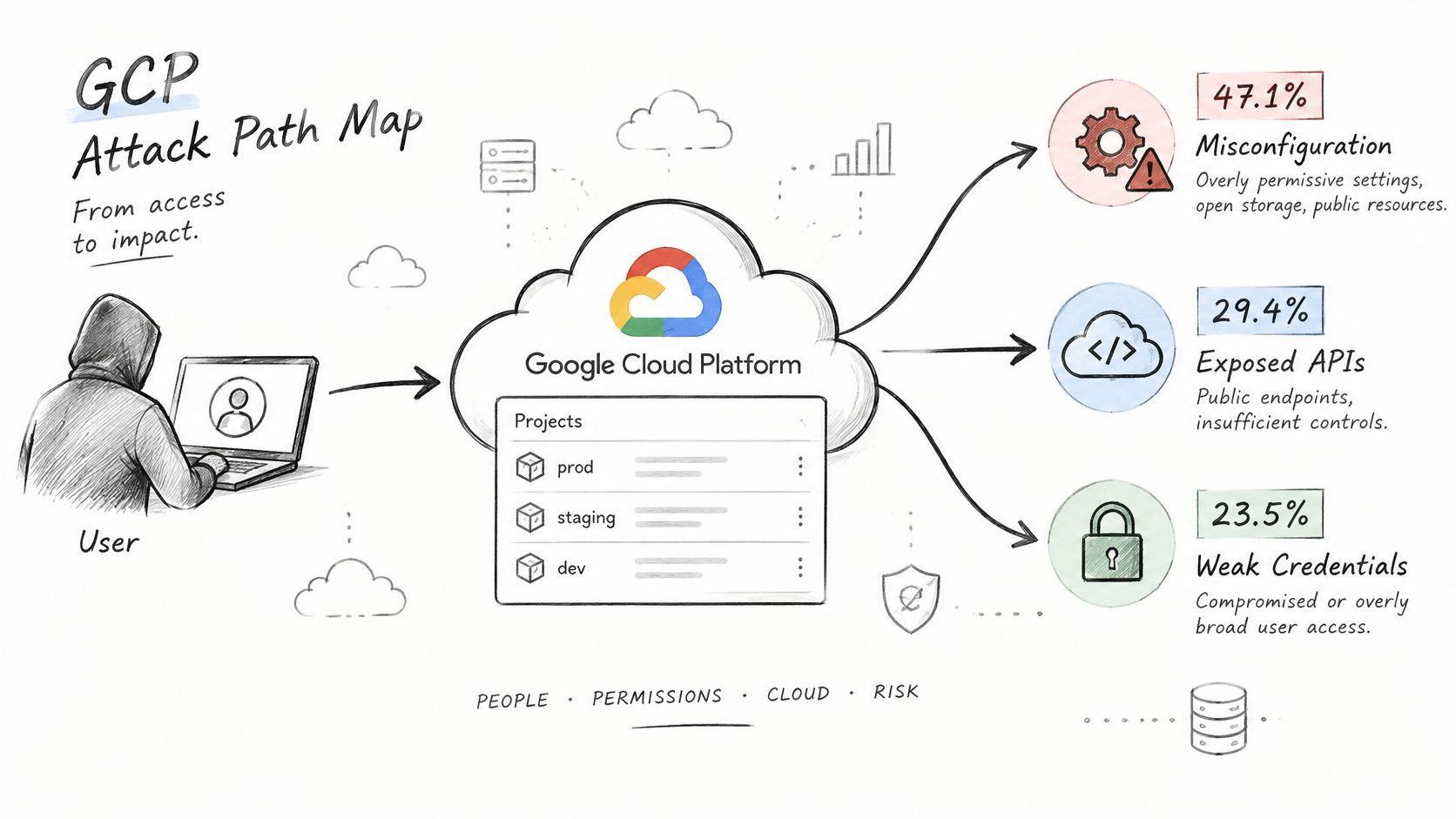
Port scanning doesn't establish what an application identity can do after compromise. The changing initial-access mix also means there's no single top GCP vulnerability worth building an entire engagement around.
Rank complete chains, not isolated settings
Start by drawing the crown-jewel data stores and listing every identity that touches them. Add public load balancers, APIs, administrative consoles, CI service accounts, and workload-identity relationships, then mark the paths your test will cover.
Rank each path using:
- Reachable privilege: What can the attacker become or change?
- Sensitive-data access: Which protected records or secrets are reachable?
- Blast radius: Does the path stop at a resource, cross projects, or affect shared dependencies?
- Time-to-exploit: What prerequisites and practical obstacles remain?
Say a public Cloud Run API uses a service account with object administrator rights on a bucket containing customer exports. Public accessibility isn't the finding by itself: prove an application authorization flaw or runtime compromise, then establish the account's effective bucket permissions.
The reduction in misconfiguration represents improvement, not elimination. Recurring testing should cover identity changes and newly exploitable workloads rather than repeat an unchanged checklist.
Use the accompanying video as a discussion aid, while keeping the client's own attack-path map as the test plan.
Tools Matched to Each GCP Test Area
GCP testing tools by test area
| Tool | Test area | Typical use | Watch out for |
|---|---|---|---|
| gcloud CLI and Cloud Asset Inventory | Inventory and IAM | Export resources, IAM policies, and service accounts | Needs read roles; output is raw data, not findings |
| Prowler | Configuration benchmark | CIS-style checks across GCP projects | Many results need manual triage |
| ScoutSuite | Multi-cloud configuration audit | Baseline comparison across cloud accounts | Coverage of newer services can lag |
| PMapper (Principal Mapper) | IAM escalation paths in AWS, not native GCP analysis | Graph of impersonation and role-based escalation in its supported environment | Not a GCP policy graph; confirm GCP paths with live calls |
| Nmap | External exposure | Port and service discovery on agreed targets | Set rate limits and stop conditions first |
| Nuclei | Known vulnerabilities on exposed services | Template-based checks | Restrict templates to avoid disruptive checks |
| Burp Suite | APIs and web UIs | Authentication and authorization testing | Manual work; scanners miss logic flaws |
| Kubescape | GKE workloads | RBAC and workload misconfiguration checks | Confirm cluster version and policy scope |
Choose tools around the question
Start with gcloud and Cloud Asset Inventory. Cloud Shell already provides gcloud; a local workstation may need installation, and Asset Inventory still needs API availability and the appropriate read permissions.
Prowler and ScoutSuite help establish a configuration baseline. Neither replaces evaluating IAM conditions, inherited access, deny policies, or whether a flagged permission is usable.
Principal Mapper is an AWS-focused tool, so don't promise a native GCP impersonation graph from it. For GCP, build the principal-to-permission-to-resource relationships from exported policies and validate candidate edges individually.
Keep application testing separate
Nmap identifies reachable services; Burp Suite tests whether users can perform unauthorized actions through them. Use Nuclei only after reviewing the selected templates, and give Kubescape a deliberately scoped Kubernetes context rather than your production administrator context.
A cloud-computing testing tools comparison can help plan coverage, but tool count isn't a measure of engagement quality.
No tool output becomes a finding until the tester manually reproduces it within the authorization matrix.
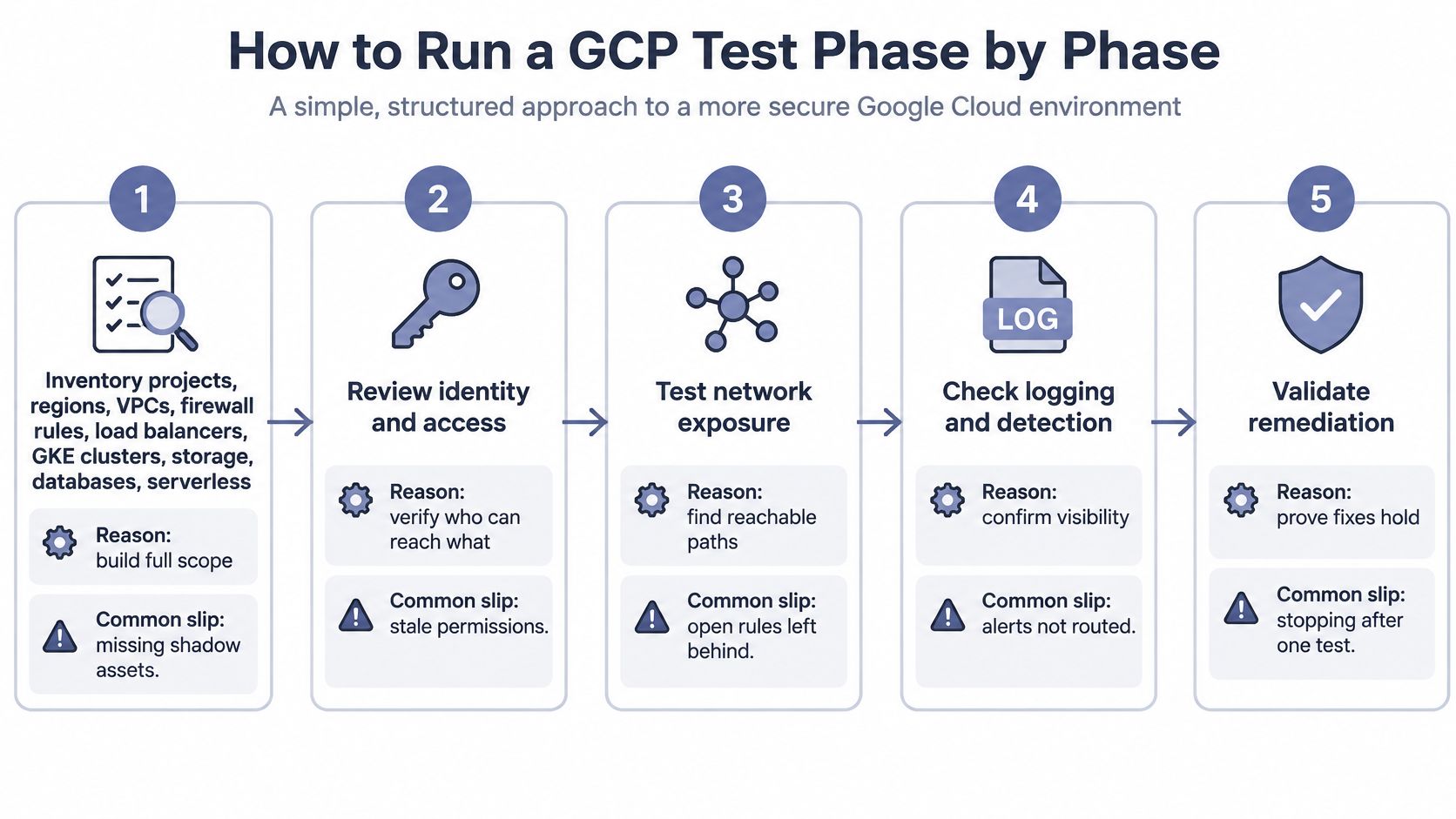
How to Run a GCP Test Phase by Phase
Begin from a written, non-destructive test plan. Keep discovery credentials separate from the identities used to demonstrate an attack path; otherwise, your own privileged access can produce a false proof.
The process overview also includes detection and remediation checks, which should accompany the technical validation steps.
Establish targets and effective access
Inventory projects, regions, VPCs, firewall rules, load balancers, GKE clusters, storage, databases, serverless workloads, and service accounts in a single spreadsheet with resource identifiers and owners. Use
gcloud asset search-all-resourceswith an explicit authorized project scope and JSON output; the common slip is treating resources visible to your account as the complete environment.Review project, folder, and organization policies using
gcloud projects get-iam-policy,gcloud resource-manager folders get-iam-policy, andgcloud organizations get-iam-policy. Flag basic roles such as Owner or Editor granted to service-account principals, but calculate effective permissions rather than reporting a role name alone; inherited grants and conditions are easy to miss.Test externally exposed services from the agreed source IP, covering load balancers, APIs, and administrative interfaces. Compare unauthenticated requests with approved user roles and test object-level authorization; a successful login doesn't prove that the application enforces tenant boundaries.
Validate identity transitions
Check whether the starting principal has
iam.serviceAccounts.getAccessTokenon a more privileged account or can change that account's policy. An approved, narrowly scoped call with gcloud'simpersonate-service-accountoption can validate the transition without displaying a bearer token; don't confuseiam.serviceAccounts.actAswith direct token issuance, because attachment-based escalation also requires a usable workload creation or modification path.From a controlled compute instance, inspect the attached identity and assess whether application behavior exposes metadata-derived credentials, then test a harmless authorized resource operation. Google's service-account best practices advise against relying on VM access scopes as a privilege boundary and identify impersonation or policy modification of more privileged service accounts as escalation risks, so evaluate IAM roles, impersonation permissions, token issuance, organization policies, and resource conditions instead.
Verify lateral movement and sensitive-data access with the least invasive proof available, such as listing an approved bucket or reading a client-created canary object.
gcloud storage buckets get-iam-policyhelps explain the grant, while an approved canary read establishes data-plane access; listing objects alone doesn't prove that their contents are readable.Reproduce each finding along the exact IAM path and record the starting principal, intermediate identity, binding, permission, resource, command, and result. A path might be a deployment user receiving token-creation rights on a workload account that holds bucket object access; the common reporting slip is collapsing that chain into an overprivileged-account label.
Confirm visibility during validation
Have the client correlate approved test actions with Cloud Audit Logs and application logs. Check whether relevant data-access logging is enabled and whether alerts reach the responsible analyst, not merely whether a log sink exists.
The mistake that wastes a test day is running commands under the wrong active identity or project. Check gcloud auth list and gcloud config list before collecting evidence, and record explicit project selection with each reproduction.
Evidence Collection and Reporting Standards
Each finding needs the principal, resource, permission, API call or command, timestamps, and reversible proof of impact. Capture the unsuccessful control case too, such as a low-privilege user being denied before an identity transition succeeds.
Evidence must distinguish what you observed from what you inferred. If you proved canary-object access, don't claim you downloaded customer exports or compromised every object in the bucket.
Preserve a chain-of-custody record
- Capture: Save command output, request and response details, tool version, active identity, and collection time under a finding identifier.
- Hash: Hash each captured artifact and record its digest in an access-controlled manifest, using a utility such as
sha256sum. - Protect: Exclude live credentials from routine capture. Quarantine accidentally captured secrets and create a redacted derivative with its own hash.
- Track: Record transfers, recipients, transformations, and deletion under the engagement's retention agreement.
Hashing proves that an artifact hasn't changed relative to its recorded digest. It doesn't prove who captured it or that its contents are accurate, which is why the manifest and access history matter.
Evidence discipline: Keep the restricted original and the delivery-safe derivative distinct. Silent editing breaks reproducibility.
Write for remediation and review
Open the report with business impact in plain language and diagram the highest-risk attack chains. Give each finding its affected project and resource, exact IAM path, reproduction steps, severity reasoning, remediation owner, and retest status.
Name the binding to remove or narrow, including its resource and condition. Replacing every broad role indiscriminately can break workloads, so recommend the smallest change that closes the demonstrated path.
For a concrete review benchmark, Google's assessment requirements specify testing within the previous 12 months, both unauthenticated and authenticated testing where authentication exists, and a majority of manually performed work rather than automated scanning or merely verifying scanner results; these aren't universal requirements for every GCP customer.
Check the client's actual review criteria before claiming compliance. A large scan-only report can still fail methodology or scope expectations.
Use a consistent penetration-testing reporting structure. Never paste live secrets into the report, provide a JSON export for dashboards, and state the methodology in a short paragraph that makes manual coverage and exclusions clear.
Retest and Closure Records
Retest starts when the client confirms a remediation is ready. Report delivery alone doesn't establish that a vulnerability has closed.
Repeat the original path
Use the recorded principal, resource, and call under the same authorization matrix and a newly agreed test window. Preserve the retest evidence separately from the original artifacts.
Mark the finding fixed only when timestamped evidence shows the path no longer reproduces. Use partially fixed when access is narrower but a harmful path remains, and not fixed when the original impact remains reproducible.
Compare IAM policies before and after remediation and recalculate effective permissions. Confirm that the intended binding changed, rather than accepting a broad policy edit that merely disables the application.
Refresh the inventory for newly created service accounts, buckets, and endpoints. A replacement deployment account can recreate the same privilege path under a different name.
Close operationally, not just technically
Check legitimate workload behavior with the project owner. An access-denied response isn't sufficient closure evidence if the client achieved it by taking the affected service offline.
For accepted risk, record the owner, compensating control, and expiry date. Distinguish an untested compensating control from one whose effectiveness you validated.
Issue a closure record containing each finding identifier, status, evidence hash, retest date, and remaining limitations. The client should be able to hand that record to a reviewer without reconstructing the engagement from email threads.
Confirm Scope and Cadence Before the First Test
This week, turn the agreed scope into an executable kickoff. Don't book the test window until the statement of work is signed and the matrix names every project, region, and approved source IP.
Run the threat model with the client's security lead and agree a short priority queue. For example, select the top ten attack paths for a hypothetical engagement, with a named data owner and a clear proof objective for each.
Prepare identities and detection
Create a dedicated test identity with least-privilege read access, separate from production administrators. Provision additional constrained test roles only where a validation scenario needs them, and prefer short-lived access over distributing service-account keys.
Confirm that the client's logging captures the planned activity. Give analysts the test identity, window, and action categories so they can distinguish authorized activity from a real incident without suppressing unrelated alerts.
- Project owners: Book a kickoff with each owner and verify that the target list reflects the deployed environment.
- Stop authority: Name who can pause execution and how the tester receives that instruction.
- Emergency signals: Agree an immediate pause for suspected cross-tenant impact, unexpected production-data access, or service degradation.
Choose cadence around change
A point-in-time test can suit a stable environment with few changes. Quarterly or continuous testing is more useful when teams frequently create projects, rotate workload identities, or expose new APIs.
Continuous testing still needs controlled execution. Use change-triggered checks for routine validation and reserve intrusive techniques for approved windows; automation shouldn't expand the authorization boundary without approval.
Budget manual review for new privilege relationships and complex application logic. Repeating configuration checks cheaply is useful, but it won't answer whether a new deployment workflow lets a low-privilege user operate as a sensitive workload identity.
Finish the kickoff with these questions:
- Written scope: Are all projects named in writing?
- Identity separation: Is the test identity separate from production administrators?
- Stop ownership: Who holds stop authority, and can the tester reach them during execution?
ThreatExploit AI offers automated penetration testing for security service providers across web, network, and cloud environments, including GCP, with evidence-backed reporting and structured exports. Visit ThreatExploit AI to explore how its reconnaissance, verification, and reporting capabilities could fit your authorized GCP testing workflow.