
Your inbox has a finished report in it: sixty findings, a methodology page, and one number your client has already read out loud on the call. They want to know which of the sixty are real before their audit in six weeks. You already suspect that a dozen will survive a manual check, that three will matter, and that whatever hurts them may not be on the list at all.
That gap between what a report lists and what is true is what false positive vs false negative analysis is about. Get the balance wrong in one direction and your client burns a week chasing a patched banner. Get it wrong in the other and they sign off on a system with an access control hole, then meet that hole again in an incident review.
Table of Contents
- False Positive vs False Negative at a Glance
- The Four Outcomes and the Metrics That Measure Them
- What Each Error Costs a Penetration Test Client
- Where Each Error Comes From in a Pentest
- How to Verify Findings and Cut False Positives
- How to Lower False Negatives Without Flooding Reports
- Choosing Which Error to Minimize by Situation
- Confirm Your Error Balance Before the Next Engagement
False Positive vs False Negative at a Glance
A false positive is a finding that is reported but does not hold up as a real, exploitable weakness. A false negative is a real, exploitable weakness the test never reports. A scanner flags an outdated Apache banner on a server where the vendor already backported the patch, the version string never changed, and the report calls it vulnerable. That is the first error. The scanner never authenticated, so the SQL injection sitting behind the login form on the account settings page was never in front of it. That is the second.
Both errors live in the same place, which is the space between what a tool asserts and what an attacker can do. The table sets them against the four criteria a reviewer checks first.
| Criterion | False positive | False negative |
|---|---|---|
| Meaning in a pentest | Reports a vulnerability that does not exist or is not exploitable | Misses a real, exploitable vulnerability |
| What the tester sees | An extra finding that fails validation | Silence where a flaw still exists |
| Typical cause | Version banner match on a patched build, stale signature, unverified rule | Hidden version string, login-gated pages never reached, out-of-scope asset, logic flaw |
| How it is detected | Manual reproduction of the finding | Coverage review, second method, retest after fixes |
The asymmetry matters more than the definitions. A false positive spends time you can see: analyst hours, a developer ticket, a call with a client who wants to know why a clean system was flagged. A false negative spends risk you cannot see, because the report says nothing, and silence reads as safety.
Ask which error a report is most exposed to
When a report lands on your desk, before you argue about severity or format, name the error it is most likely to contain. A report built on banner matching is exposed to false positives. A report built on one unauthenticated scan of a login-gated application is exposed to false negatives, and those are the ones that end relationships. That single question reorders how you review your own work and how you brief a client on what they bought.
The Four Outcomes and the Metrics That Measure Them
Four outcomes exist, not two, and only one of them is the result you want.
| Outcome | Ground truth | Tool result | Metric affected |
|---|---|---|---|
| True positive | Vulnerability is real | Reported | Raises recall and precision |
| False negative | Vulnerability is real | Not reported | Lowers recall: TP / (TP + FN) |
| True negative | No vulnerability | Not reported | Counts toward specificity |
| False positive | No vulnerability | Reported | Lowers precision: TP / (TP + FP) |
A true positive is a real flaw reported correctly. A true negative is a non-issue the tool correctly ignores. Those two outcomes earn a tool its reputation, and they're the ones a vendor will quote. The matrix below turns the same four outcomes into a picture.
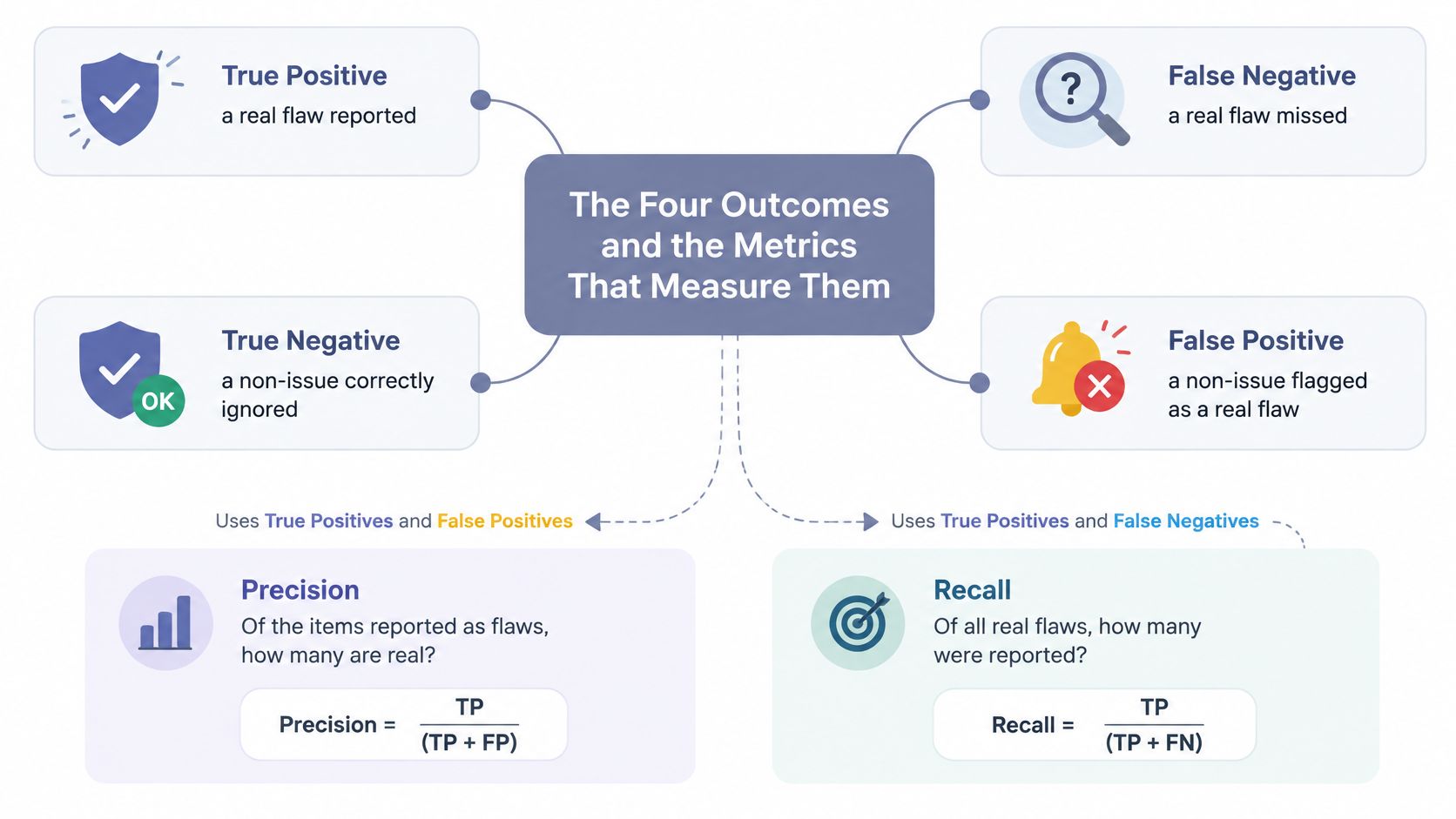
The OWASP Benchmark measures this properly against labelled Java and Python test cases, one intentional CWE per case, each marked as a real or fake vulnerability. Its definitions match the matrix exactly: a true positive is a real vulnerability correctly reported, a false negative is one the tool fails to report, a true negative is a fake vulnerability correctly ignored, and a false positive is a fake vulnerability reported as vulnerable. Because every case is labelled, the counts are objective rather than argued.
Recall and precision measure different things
Recall, which OWASP also calls the true-positive rate, is TP divided by TP plus FN. It answers one question: of everything real that was sitting there, how much did the test catch? Precision is TP divided by TP plus FP, and it answers the other question: of everything the report claimed, how much survives scrutiny? A method can score well on one and badly on the other, which is why averaging them into a single accuracy figure destroys the information a client needs.
OWASP's own examples make the trap concrete. A tool that reports everything finds every vulnerability and generates 100% false positives, while a tool that reports nothing has zero false positives and detects zero real vulnerabilities. Both are worthless and both could claim a clean-looking score under the wrong metric.
For a report, that means stating recall and precision, or the raw false-positive and false-negative counts, for the specific method used. A provider that publishes one accuracy percentage has told you nothing about which way its errors lean, and that lean is the part that decides what happens to your client.
What Each Error Costs a Penetration Test Client
Raw accuracy misleads because real flaws are rare in most targets, and rarity drives the arithmetic of alerts. The National Cancer Institute's breast cancer screening summary shows the shape of it: fewer than 5 in 1,000 screened women have breast cancer, while mammography specificity is approximately 90%, so most abnormal mammograms turn out to be false positives even though the test is reasonably specific. Swap the disease for a vulnerability class. When a target holds only a handful of exploitable flaws across hundreds of checks, a specific scanner can still spend most of its alerts on non-issues, and a long finding list proves nothing about effectiveness.
What a false positive costs
Analyst hours go first, because someone has to reproduce each claim before it reaches a developer. Then developer time spent patching something that was never broken, which is worse than wasted, since a change to a working component carries its own risk. Then the conversation with a client who wants to know why a clean system was flagged, and the quieter cost after it, which is a team that discounts the next report on sight.
What a false negative costs
Nobody sees this one until later. The flaw survives, the report provides assurance it did not earn, and an auditor, a bug bounty hunter or an attacker finds what the test missed. The invoice arrives months after the engagement closed, and it arrives with your name on the methodology page.
A report with no findings proves that the method found nothing. It does not prove that nothing is there.
Suppose a report lands with 40 findings, 35 of them false positives. The client spends roughly 30 hours of combined analyst and developer time reproducing, debating and closing tickets for issues that do not exist. Meanwhile a broken access control flaw on the account settings page, never tested because the scan ran unauthenticated, stays exploitable for months. The visible cost consumed the budget that the invisible risk needed.
Which cost dominates depends on the client's exposure and their remediation capacity. A hospital security team of two drowns under false positives and cannot fix anything. A payment processor that signs off on a clean report carries the false negative into an audit. That is a decision about consequences, not about accuracy, and it's the decision the situation table later turns into a rule.
Where Each Error Comes From in a Pentest
Five mechanisms produce most of the errors in web and network work, and each leaves a trace a tester can follow.
Version strings lie in both directions
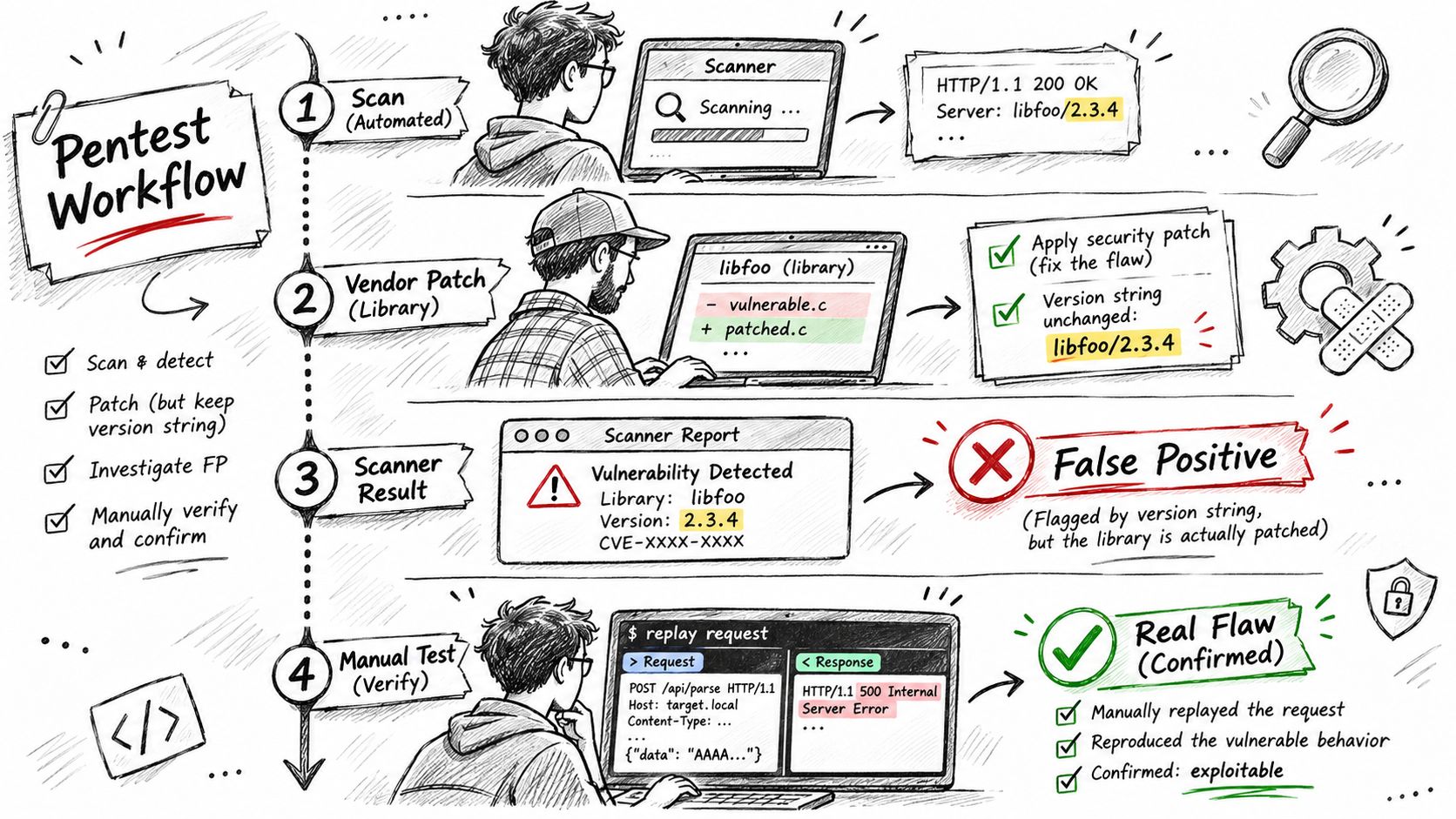
The OWASP Testing Guide documents both failures. An administrator who removes or obscures the web-server version leaves the scanner unable to identify the build, so it stays quiet while the vulnerable condition remains. The mirror image is a vendor who patches a library but never updates the version string, so the scanner reads an apparently vulnerable build and reports an issue that no longer exists. The signal: a banner that disagrees with observed behaviour. If the headers claim an old release but the response patterns match a current one, open the box and check the actual package.
Coverage gaps look like clean results
An unauthenticated scan never reaches login-gated pages, role-restricted functions or APIs outside the target list, so the absence of findings on those surfaces is an artefact of the method. The signal: the crawler's request log. If no authenticated session appears in it, everything behind the form is unexamined, and teams that want a clear picture of what each phase is supposed to cover will find penetration testing types and phases useful when they write the rules of engagement. Comparing the crawl map against the sitemap and the API documentation exposes the gap quickly.
Rules, rate limits and logic
Signature rules misfire on benign responses, most commonly when a generic error page contains a word like syntax and the pattern matcher reads it as an injection result. Environment problems cut both ways: a web application firewall blocking a payload produces a false negative that looks like a clean result, and a misread response produces a false positive that looks like a hit. Logic flaws sit at the far end, because broken access control or price manipulation has no signature to match, which makes them a false negative by default until someone sits down and tries the workflow by hand.
The distinction between automated scanning and a full engagement matters here, because most of these mechanisms are properties of the scanner rather than of the target; how DAST and penetration testing differ is worth reading before you promise a client that one substitutes for the other. Reconnaissance and version matching find candidates. Verification decides what is true. Watch for responses that differ from the scanner's expected pattern, login paths the crawler never reached, and banners that contradict the application's behavior.
How to Verify Findings and Cut False Positives
NIST SP 800-115 treats error reduction as two distinct jobs: configure and calibrate scanners to minimize both error types, then interpret the results to identify genuine vulnerabilities. It allows manual examination of the vulnerable system or comparison against a second automated tool, and it warns that two tools can generate the same false positive, so tool-to-tool agreement is not proof of correctness. Its verdict is blunt: manual examination is typically more accurate than comparing automated results, though it takes substantially more time. Scanner output is a hypothesis. Exploitability confirms it.
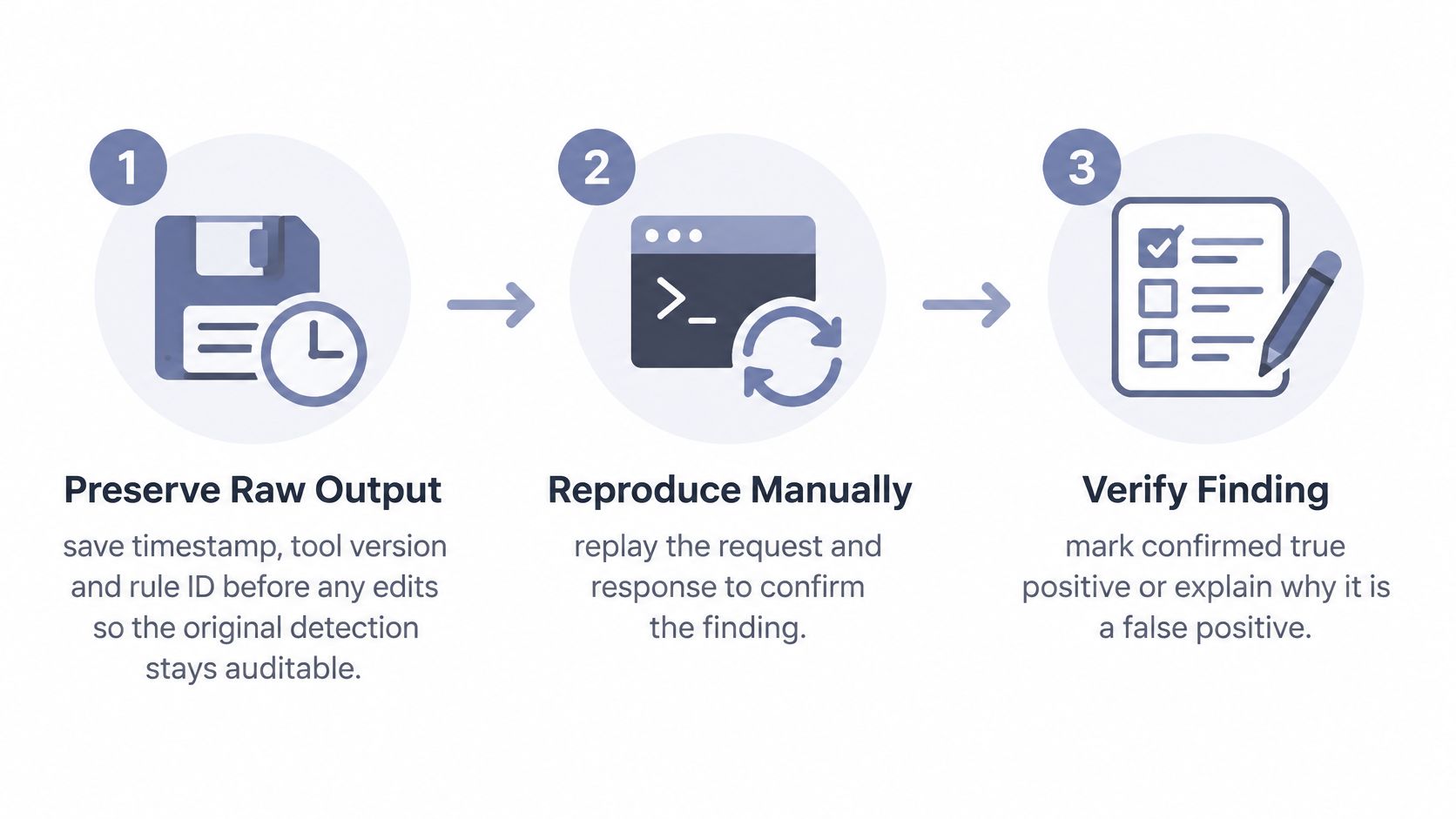
- Preserve the raw output. Save the scan file with its timestamp, tool version and rule ID before you touch a single line. When a client disputes a finding three weeks later, the original detection is the only record of what the tool said.
- Reproduce the request by hand. Send the same request with the same credentials, headers and parameters. If you cannot make the response repeat, you do not have a finding yet, and the sooner you discover that, the fewer hours you waste writing it up.
- Confirm the security condition, not the banner. For an injection, show a controlled change in the database response. For cross-site scripting, show script execution in the rendered context. The claim in the report is that data or control crosses a boundary, so that crossing is what you demonstrate.
- Capture the evidence in the same pass. Store the request, the response, a screenshot and the exact sequence of steps that produced impact. Evidence assembled afterwards from memory is where reports start to drift from what happened.
- Escalate to a second method when the result is ambiguous. A manual check or an independent tool adds information, but treat agreement between two scanners as weak. They share signature sets, crawlers and blind spots, so they fail together often enough to matter.
- Label every finding. Confirmed, disproven as a scanner false positive, or unverifiable with the reason stated. The label is what lets a client's developer know whether to open a ticket or close one, and it stops a technical reviewer from relitigating the whole report.
- Keep disproven findings in a labelled appendix. Deleting them hides work the client paid for and prevents them from checking what the scanner originally reported. An appendix of ruled-out items is evidence of rigour, and auditors ask for it more often than vendors expect.
A short walkthrough of the same discipline in practice helps before you build your own checklist.
Our own workflow applies that rule mechanically: finding accuracy is 94%, and every finding is verified with evidence and screenshots before it reaches a client. The same discipline shows up in evidence-based report writing, where the standard is that a reader can retrace the exploit path from the report alone. When verification volume outgrows the team, the honest response is to hire penetration testers rather than to relax the validation step, because a report that skips it just moves the cost to the client.
Record each verification outcome in one log: candidate, disposition, method, minutes spent. After twenty engagements that log tells you your own confirmation rate, which surfaces are consistently noisy, and where your coverage keeps thinning out.
How to Lower False Negatives Without Flooding Reports
Every adjustment that catches more real flaws also generates more candidates to review, and that review is the bill.
| Adjustment | Effect on false negatives | Effect on false positives | Use when |
|---|---|---|---|
| Add authenticated scanning | Lowers, by reaching login-gated pages | Rises slightly as more surfaces are tested | Role-based apps and admin panels |
| Raise scanner sensitivity | Lowers | Rises sharply | Discovery phase with capacity to validate |
| Lower scanner sensitivity | Rises | Falls | Noisy targets with limited triage time |
| Add manual business-logic tests | Lowers for logic flaws scanners cannot see | Near zero, since logic findings are exploited | Payment, role and approval workflows |
| Retest after remediation | Lowers the chance an unfixed or variant flaw slips through | Falls, as stale findings are closed | Every fix cycle |
Authenticated scanning is the cheapest recall you will ever buy. Credentials turn a login wall from a blind spot into a tested surface, and the extra candidates it produces are usually easy to triage.
Raising sensitivity is the expensive one. A 2025 JMIR study of a hospital deployment shows the shape of the trade-off: Hospital A's false-negative rate fell from 8.4% to 5.16%, while its false-positive rate rose from 2.36% to 9.77% (JMIR, 2025). Detection improved and the review queue roughly quadrupled. Only raise sensitivity where someone is funded to read the output.
Lowering sensitivity is a legitimate choice for a noisy target, but say so in the report. A quiet report that reached quiet by turning the dial down is a different product from a quiet report that reached quiet by finding nothing.
Business-logic work does not flood anything, because each finding is exploited before it is written. Checkout flows, role changes and multi-step approvals need a tester who can model the intended behaviour, and testy bezpieczeństwa OWASP provides a baseline checklist worth starting from before you go beyond it. Building this into a standing vulnerability management programme keeps the same flaw from returning unannounced.
What a clean retest does not prove
The U.S. General Services Administration's penetration-testing guidance draws the line clearly. A pentest can verify and prove that particular findings are false positives or false negatives, but it is not exhaustive and cannot prove a system contains no vulnerabilities. The same document says a pentest should not produce false-positive findings, since it reports what was found, and that scan-generated false positives should be labelled, not deleted. Confirming one missed flaw proves that one coverage gap existed. It says nothing about the rest.
We state that limit in our own terms: we do not warrant that the service will detect all vulnerabilities, or that findings will be free of false positives or false negatives. No honest provider can promise otherwise. What a provider can do is name the scope, the method and the disposition of every item, so the client can judge what was tested.
Choosing Which Error to Minimize by Situation
No single setting is correct. The error to minimize follows the consequence the client faces, and a provider who ships one tuning profile to every engagement is guessing.
| Situation | Error to minimize | Accepted trade-off | Verification standard |
|---|---|---|---|
| Compliance audit with fixed scope (PCI DSS, SOC 2) | False negatives within scope | Some extra candidate findings | Every finding evidence-backed; scope gaps documented |
| Continuous or recurring monitoring | False positives | Slightly lower detection between cycles | Automated re-validation; suppressed alerts logged |
| Sensitive data in healthcare or finance | False negatives | More triage hours | Manual exploitation of critical access paths |
| Small team with heavy scanner output | False positives | Possible missed low-severity flaw | Validate high and critical findings first |
| Red-team or bounty-style engagement | Neither; prioritize proven exploitation | Narrower breadth | Working proof of concept per claim |
For a fixed-scope compliance audit, an auditor will not accept "the scanner said so", so recall within scope is the goal and every finding needs evidence attached. Document what fell outside scope instead of implying coverage you did not have.
Recurring monitoring fails from alert fatigue before it fails from missed detection. A modest per-test false-positive rate compounds across frequent cycles, which is why a ten-year screening analysis in the 2016 U.S. Preventive Services Task Force evidence review found a cumulative false-positive rate of 61% for annual mammography against 42% for biennial screening. The per-round error was modest; the accumulation was not. Suppress aggressively, log every suppression, and schedule a deeper test each cycle to cover the gap.
Regulated sectors justify the triage hours, because a missed access control flaw on patient or cardholder data is the finding that reaches a regulator. Small teams should validate critical and high findings first and write down what they did not validate, which is more useful than a uniform pass over everything. Red-team and bounty work solves the argument differently: a working proof of concept per claim limits both errors at once, because the claim and the evidence are the same artefact.
Confirm Your Error Balance Before the Next Engagement
- Seed a test environment with known flaws, and add a few safe decoys that look vulnerable, such as an old banner on a patched service. Decoys are how you catch a method that matches metadata instead of behaviour.
- Run your normal tool or method and sort each result into the four outcomes. Sorting is the point; an unsorted list of candidates teaches you nothing.
- Calculate recall and precision from the counts, using TP divided by TP plus FN and TP divided by TP plus FP. Keep them separate. Averages hide the lean that matters.
- Review every missed flaw to identify the coverage gap behind it: authentication, scope, environment or logic. Each gap maps to one specific adjustment.
- Repeat the seeded run with a second method before you adopt or renew anything, and compare the two error profiles.
Keep the seeded set unchanged between runs so the counts stay comparable, and log the tool version with each run. A free account is available with no commitment required if you want to run that comparison against an automated engine before committing to a full engagement.
The test of success is written, not felt. Before the next client report goes out, your team should be able to state its false-positive count, its known false-negative areas, and the evidence behind each claim, in a sentence or two, without opening the tool.
ThreatExploit AI runs automated penetration tests that carry each candidate finding through exploitation and attach the evidence, so a report reaching your client has already survived the verification step this article describes. The platform pairs autonomous reconnaissance and exploitation across web, network and cloud targets with compliance-mapped reporting for frameworks like PCI DSS, SOC 2 and HIPAA, which keeps the false positive vs false negative conversation grounded in artefacts rather than assertions. Visit ThreatExploit AI to open a free account or request a demo and run a first target through it.