
You're looking at one POST URL, two staging tokens, and a schema that lets the client pick every field. A green 200 doesn't mean the query was allowed. A nested owner or invoice selection can return another tenant's record even when the root object looked safe. GraphQL API testing on a pentest is about proving who can see what along those relationship paths, then tying any resource-limit result to a measured cost and a request you can replay.
Table of Contents
- Scope and the Five Stages of a GraphQL API Test
- How to Map the Schema Through Introspection
- How to Build an Authorization Matrix for GraphQL
- How to Fuzz Arguments and Read Resolver Errors
- How to Test Depth, Alias and Cost Limits Safely
- Automate the Checks with curl and Scripts
- Evidence That Makes a GraphQL Finding Hold Up
Scope and the Five Stages of a GraphQL API Test
Before the first request, confirm three things. You need written client authorization for the endpoints and the scope. Testing stays limited to targets the client has defined. Agree a stop rule for the resource tests in stage 5 so a shared staging box doesn't get taken down. We only run tests against targets the customer defines and authorizes, and scope, testing mode, and schedule are set before anything launches. For each engagement on the autonomous platform or Studio, the customer must confirm and attest that they are authorized to test the specified targets and scope.
Prepare the environment next. Use a staging endpoint, at least two test accounts from separate tenants, and a folder for the schema file. If you want to see how an automated run looks before a client engagement, create a free account at portal.threatexploit.ai/register, explore the platform, and run a test pentest to see results firsthand. Broader API work, including how GraphQL sits next to other styles, is covered in our API penetration testing notes. The single-endpoint model is also why REST habits fail here. GraphQL versus REST at Up North Media is a useful contrast when a colleague still routes every check by URL.
The OWASP GraphQL hunting notes lay out five controlled stages. Run them in this order.
- Identify the endpoint and deployment mode. Check whether introspection, persisted queries, subscriptions, batching, and aliases are enabled.
- Obtain and normalize the schema where you're permitted to. Treat unknown-field errors as reconnaissance, not vulnerabilities.
- Build an authorization matrix with at least two tenant accounts. Test every query, mutation, nested resolver, node lookup, and field for horizontal and vertical access-control failures.
- Fuzz scalar and structured arguments for injection, type confusion, excessive pagination, and unsafe error disclosure.
- Verify resource controls with bounded depth, alias, batch, and operation-cost tests.
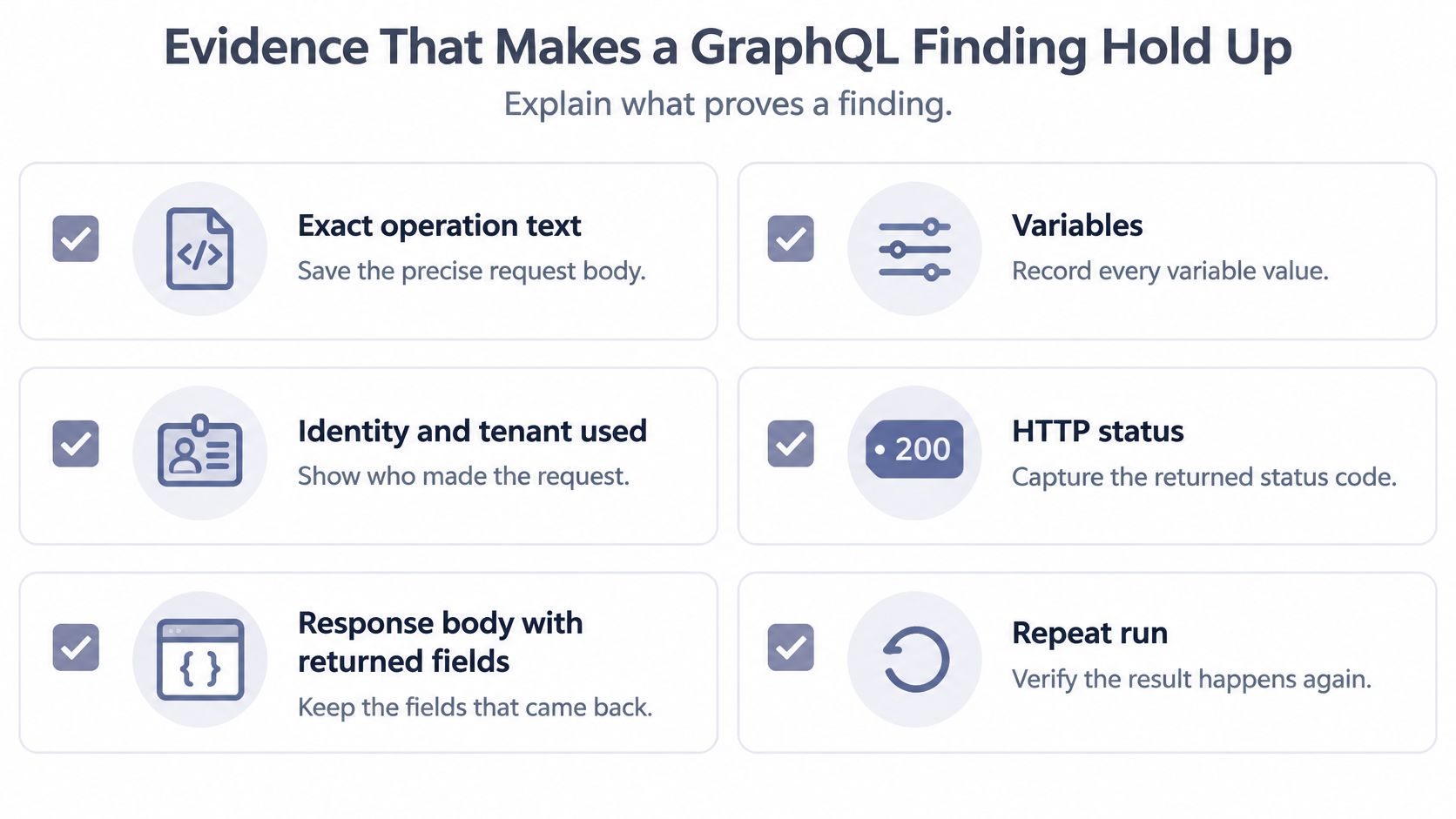
OWASP specifically recommends comparing access through root, node, and nested resolvers, including mixed authorized and unauthorized objects in one request, because resolver-level checks can differ even when endpoint authentication is correct. Record the exact operation, variables, identity, tenant, HTTP response, returned fields, and a repeat run so a finding is distinct from normal product behavior.
| Stage | Goal | Evidence to keep | Typical tool |
|---|---|---|---|
| 1. Endpoint and mode | Find the endpoint and enabled features | Introspection, subscriptions and batching status | Burp Suite or curl |
| 2. Schema | Obtain or rebuild the schema | Normalized schema file and unknown-field errors | Postman or Bruno |
| 3. Authorization | Compare access across identities | Identity matrix with responses per object | Two test accounts and Burp Suite |
| 4. Fuzzing | Probe arguments and read error output | Exact payloads, error text and reproduced responses | Burp Suite with custom scripts |
| 5. Resource controls | Measure depth, alias, batch and cost limits | Limit values, rejection boundary and latency | curl scripts with timing |
Schema knowledge makes the authorization tests precise. Resource tests come last because they can disrupt a shared environment. Verify who can see what before chasing other issues. An authorization gap is usually the finding that matters most.
How to Map the Schema Through Introspection
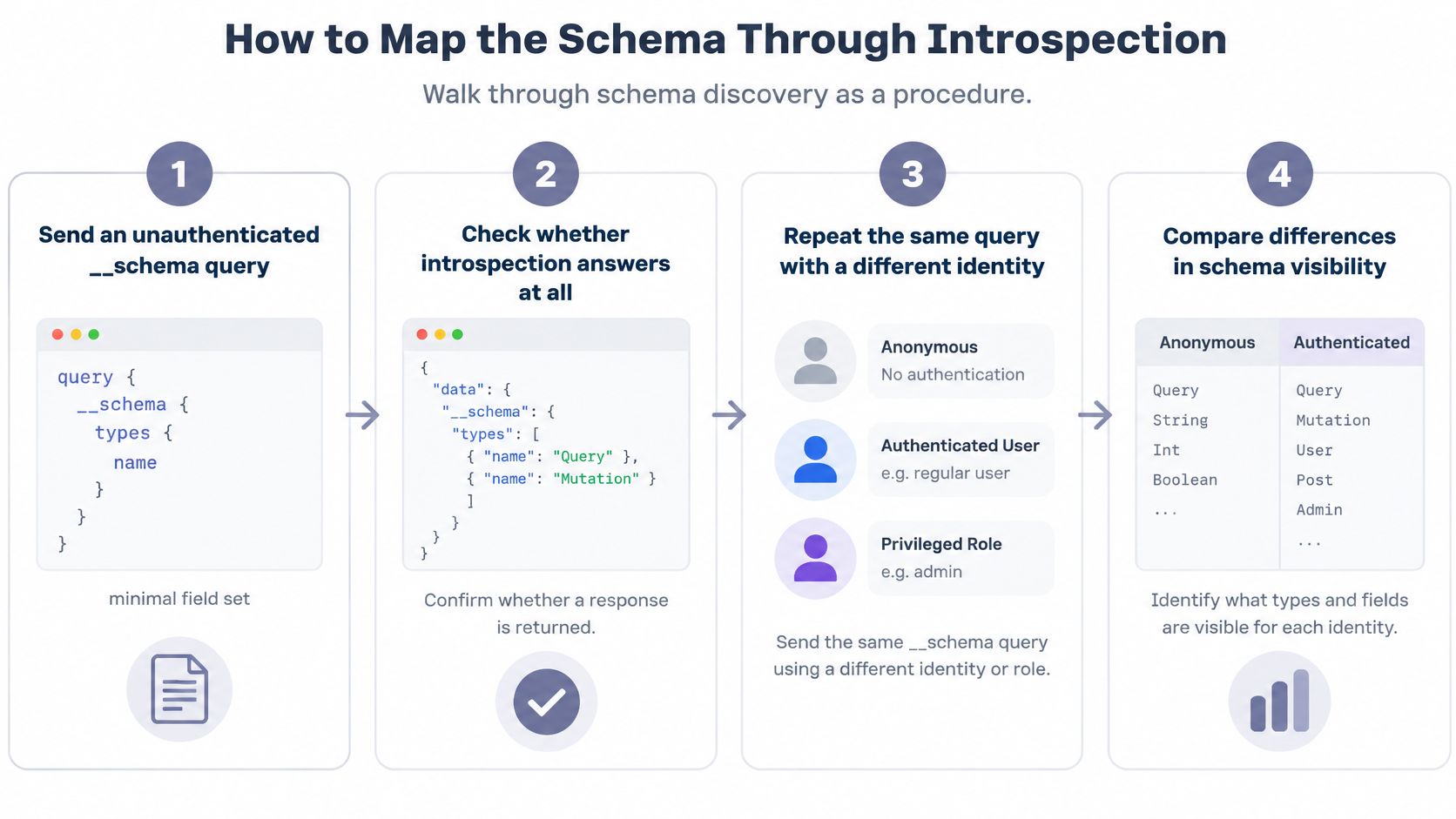
Schema discovery is a procedure, not a single lucky query. The OWASP Web Security Testing Guide for GraphQL starts that work with introspection requests such as __schema and __type, because an exposed schema reveals types, fields, arguments, and relationships.
Send the probe, then change identity
- Send an unauthenticated
__schemaquery with a minimal field set, such as the query type name. You're checking whether introspection answers at all, not dumping the whole graph on the first packet. - Repeat the same query with a low-privilege token and compare the two bodies. A privileged-only run hides which fields are public. That slip is how testers miss an open schema.
- Request
__typefor sensitive names such as User, Invoice, Payment, or Admin. You want their fields and arguments so the next section's matrix has real operations, not guesses. - If introspection is blocked, don't stop. Pull field names from client bundles, mobile apps, and public docs. Unknown-field errors and suggestion messages rebuild a lot of the schema.
- Save the normalized schema and tag each sensitive query and mutation. Those tags become the rows you'll replay under each identity.
Exposure is not the finding
GraphQL itself doesn't enforce permissions by default. Authorization has to be implemented by the application, so a successful login isn't enough. OWASP recommends restricting access to introspection rather than automatically disabling it, because disabling the feature can break legitimate tooling and operational workflows. Exposure isn't necessarily a standalone vulnerability, but it can materially improve an attacker's ability to identify sensitive functionality and construct authorization-bypass requests.
Practical rule: Hold three artifacts before you leave schema work: the schema file, a list of sensitive operations, and a written note of which identities can see the schema.
How to Build an Authorization Matrix for GraphQL
A resolver can protect a top-level object and still leak a linked record deeper in the response. GraphQL doesn't enforce permissions by default, so a single "user can call order" check is not an authorization test. The OWASP GraphQL Cheat Sheet says authorization must be enforced on both edges and nodes. Protecting a list doesn't protect the object a resolver returns if that node lacks an ownership check.
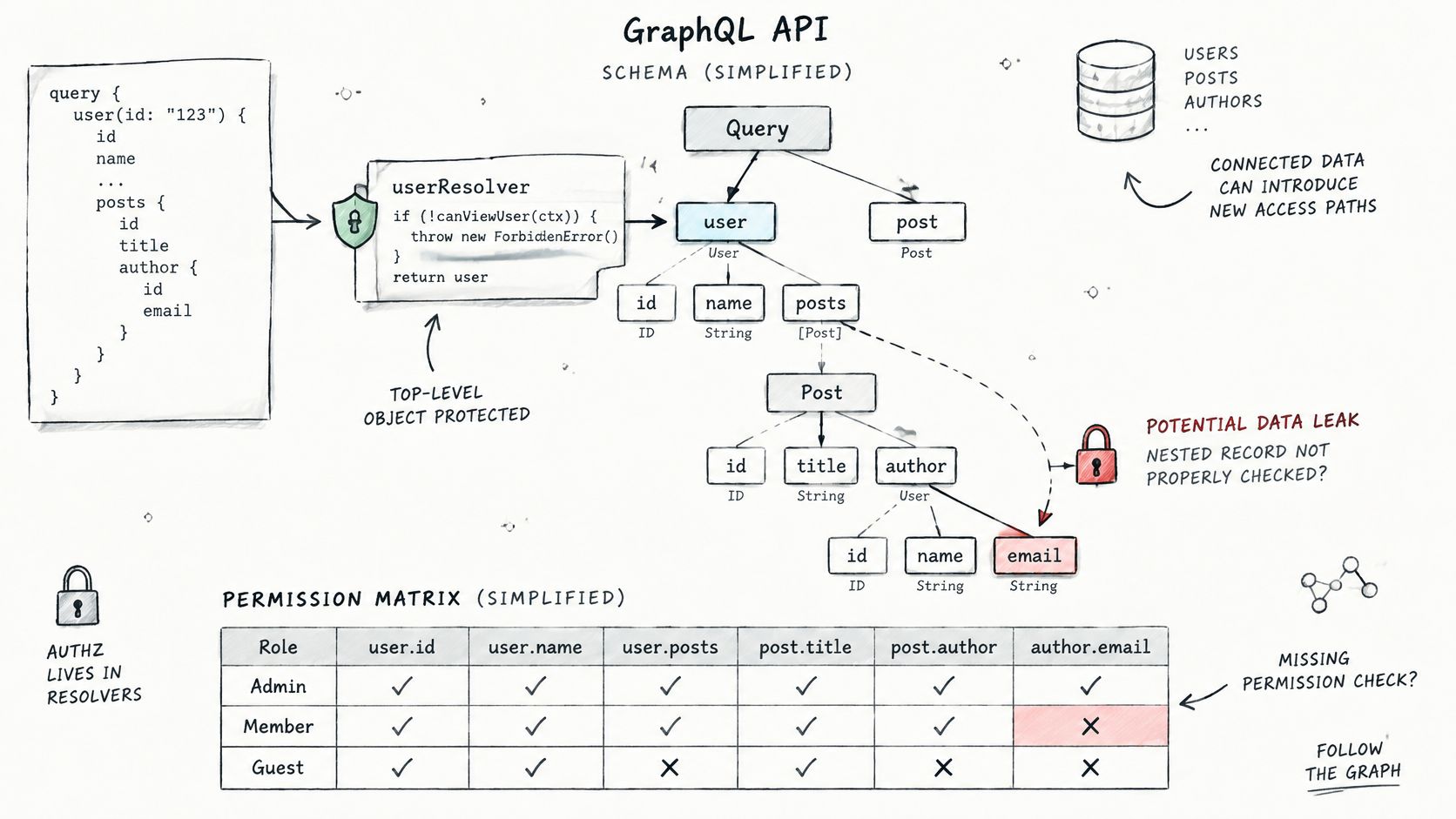
Build the matrix with five identities that all belong to the client engagement: anonymous, ordinary user, record owner, administrator, and a user from another tenant. OWASP recommends validating that every requester is authorized to view or modify the specific data requested, using mechanisms such as role-based access control. Compare the same query under those identities, alter object identifiers, and traverse edges.
| Identity | Expected access | Test to run |
|---|---|---|
| Anonymous | Public fields only | Replay every sensitive query with no token |
| Ordinary user | Own records and public fields | Request another user's ID through the same query |
| Record owner | Own records, including owned fields | Confirm owner-only fields return, then remove the token and retest |
| Administrator | Admin actions within own tenant | Check whether admin-only mutations fail for ordinary users |
| Other tenant user | Nothing from the first tenant | Swap tenant IDs inside nested objects and linked records |
Walk the paths from simple to subtle
- Pick one object query, such as
order(id), and run it as every identity. Save status,errors, and the fields that came back. A 200 withdata: nullis a different result from a 200 that includes another user's email. - Replace the ID with an object owned by another user and replay the request. That's the broken object-level case. If the body matches the owner's response, you have a finding.
- Traverse edges. Request
owner,invoice, orteamthrough the parent. A clean root object with a foreign child is the leak most root-only checklists miss. - Mix an authorized object and an unauthorized object in one request using aliases or a list of IDs. Resolver checks often differ between the root path and a nested path. One allowed node can carry a denied node beside it.
- Repeat each mutation with a changed ownership field, then test chained mutations that create a record and read it back. Function-level failures show up when an ordinary user can call an admin mutation, or when a create sets
role,owner, or tenant.
These map directly to broken object-level authorization and broken function-level authorization, not to introspection or injection. Every identity you use must belong to the engagement. The aim is to verify the client's access checks, not to get around identity controls. Customers must not use the API to circumvent the identity, authorization, or safety controls that apply to the platform. When a control is missing, point the developer at how to strengthen API authentication so the fix is an ownership check on the node, not a thicker login wall.
The short walkthrough below shows the same idea on a live query: same operation, swapped identity, different fields in the body.
How to Fuzz Arguments and Read Resolver Errors
Fuzzing here is about argument types and what resolvers return, not a blind wordlist against a URL. Start with each scalar, then read the errors array. The message usually tells you more than the status code, and GraphQL often stays on 200 while a resolver fails.
| Response clue | Likely meaning | Next step |
|---|---|---|
| Unknown field or type error | Reconnaissance signal, not a bug by itself | Record suggestions and map the field for the authorization matrix |
| Database or ORM error text in the errors array | Unsafe error disclosure and possible injection | Reduce to a minimal payload and confirm with a boolean difference |
| Stack trace with file paths | Debug mode or verbose error handler | Note the path and version and report as misconfiguration |
| Array accepted where a scalar is expected | Loose type validation | Test whether the array reaches a database query |
| Data is null with partial errors | Resolver failure isolated to one field | Check whether other fields in the same response leak data |
| Operator such as $ne accepted in a filter | Nested-argument injection candidate | Compare returned record counts with and without the operator |
What to send, and what not to call a bug
For strings, include SQL and NoSQL metacharacters. For integers, hit boundaries such as 0, -1, and a very large value. Send a list where a scalar is expected, an object where a string is expected, and null. Then move into resolver logic.
Pagination is the first place resolvers trust the client. Try a very large limit or first, then a negative one. If the API returns a huge page or a database error, you've moved past type confusion into behavior.
Filters are next. A where argument that accepts $ne or $regex is a nested-argument injection candidate. Compare record counts with and without the operator. A count that jumps is evidence. A single odd status code is not.
Mutations often accept fields the UI never sends. Add role, owner, or price to the input object. If the stored record changes, the resolver trusted client-supplied ownership or privilege.
Nested arguments can pass down to resolvers that build database queries, so an injection in a deep argument can survive a clean top-level check. Record the exact operation and variables for every case.
A single 500 is not a finding. A reproduced response that differs from normal behavior, and that exposes data or internal detail, is.
How to Test Depth, Alias and Cost Limits Safely
Demand-control tests use a calibrated sequence, not a flood. GraphQL's security guidance describes query-complexity analysis as weighting types and fields and rejecting requests whose calculated cost exceeds a configured maximum. GraphQL.js gives the implementable sequence: parse the document, walk its AST, assign field costs, then reject or log operations above a threshold. OWASP likewise recommends query-cost analysis so expensive operations don't consume excessive resources.
- Record baseline latency and response size for a normal query. Everything later is a delta from that number.
- Increase nesting depth one level at a time until the server rejects the request. Note whether rejection happens before the resolver runs.
- Request a list field with
first: 100, thenfirst: 1000, across connected objects. That's fan-out, and it can be expensive while depth stays small. - Add aliases of the same expensive field, first 10 and then 50. You're checking whether cost counts repeated fields or only unique ones.
- Send batched operations in one HTTP request and compare the operation count with the configured batch limit.
- Stop at the first rejection and record the boundary, the status, and the latency.
| Control | Test pattern | Pass signal |
|---|---|---|
| Depth limit | Nested relationship, one level per request | Rejected before the resolver runs above the configured depth |
| Query cost | Selection with many list fields, compare calculated cost to the configured maximum | Operation rejected when calculated cost passes the maximum |
| Alias limit | Same expensive field as 10 aliases, then 50 | Rejected or counted toward the cost total |
| Batching limit | One operation, then N operations in one HTTP request | Batch size capped or each operation counted |
| Execution timeout | Deep, wide query on a large dataset | Request ends with a timeout error and no backend exhaustion |
| Rate limiting | Repeated login mutations inside one batch | Limit counts operations, not only HTTP requests |
A depth-only rule misses aliases and list fan-out. A shallow query can still be costly. A successful subscription connection isn't proof of subscription security either. Retest authorization on actual messages and after logout. Rate limits that only count HTTP requests miss batches. Fetchin's guide to API throttling is a clear explanation of why the unit you count has to match the work the server does. Pair that with our notes on best practices for API security when you write the recommended limits.
Report the configured limit, the observed rejection boundary, and the residual resource impact. Don't declare a vulnerability only because complex queries were accepted.
Automate the Checks with curl and Scripts
Script each stage so the same requests run on every engagement. Keep scripts read-only where you can. Run mutation tests only against seeded staging records, and add a reset step afterward.
- Store the endpoint and tokens as environment variables, for example
ENDPOINT,TOKEN_LOW, andTOKEN_ADMIN. Nothing sensitive gets typed twice, and a colleague can swap tenants without editing the query. - Send the introspection probe with curl and save the body with the HTTP status. A status-only log will hide a 200 that still contains
errors.
curl -s -X POST "$ENDPOINT" -H "Content-Type: application/json" -H "Authorization: Bearer $TOKEN_LOW" -d '{"query":"{ __schema { queryType { name } } }"}'
- Loop the same operation over every identity in the authorization matrix and write one file per identity. A diff of those files is faster than rereading five Burp tabs.
- Time each resource-control request and stop the loop at the first rejection. The timing line is the cost evidence, not a screenshot of a spinner.
curl -s -o body.json -w "%{http_code} %{time_total}"
- Export the normalized schema and the list of sensitive operations into the evidence folder with a timestamp. Store each run's command, variables, and output so a retest sends the exact request.
When a script result looks odd, replay that one request in Burp Suite or Postman. Automation finds the difference. A manual replay confirms it isn't a script bug.
Evidence That Makes a GraphQL Finding Hold Up
A finding holds when someone else can send the same operation and get the same data. For each one, record the exact operation text, the variables, the identity and tenant, the HTTP status, the response body with returned fields, a repeat run, and a baseline from a legitimate user.
Separate a theory from a measured risk
GraphQL sends traffic to one endpoint, so URL-based monitoring shows almost nothing. The Mironsoft production checklist is direct about what you need: operation name, duration, complexity, depth, error count, and resolver-level traces. Correlate the case with execution cost, backend calls, identity, and rate-limit accounting. Batching can pack many operations into one HTTP request, and nested or recursive selections can create disproportionate server work, so a control that only counts requests can underestimate login attempts or backend load.
Use bounded canary payloads, staged load increases, resolver traces, and before-and-after telemetry. Then report exploitability, affected identities, estimated resource cost, and recommended limits for depth, complexity, operation count, and trusted documents. Don't disrupt the environment to prove a point you can show with a small, timed request.
How the report should read
- One finding per authorization gap. Don't bundle a cross-tenant read with a verbose error. They have different fixes.
- Severity follows the data exposed. A reproduced cross-tenant read ranks higher than a rejected oversized query. The first exposes data. The second shows a working control.
- Evidence is attached to the finding, including the diff against the legitimate user's baseline.
- A retest step sits after the developer ships a fix, using the saved command rather than a new query you invent on the day.
That standard applies to every finding before the report leaves the team. How to structure those evidence-backed writeups is covered in our guide to penetration testing reporting.
ThreatExploit AI runs automated penetration testing for security service providers, including web applications and GraphQL APIs, and it collects evidence you can hand to a client. If you want reconnaissance, verification, and reporting on the targets you're already authorized to test, visit ThreatExploit AI.