
Most MSSPs don't need faster vulnerability discovery. They need a better way to decide which findings deserve expensive human attention. That distinction matters because web applications already represent the largest segment of the broader penetration testing market, according to market estimates summarized by DeepStrike. One estimate values the global penetration testing market at USD 1.82 billion in 2023 and projects USD 5.24 billion by 2030, with web applications holding the largest revenue share in 2023. Another report puts the broader market at USD 2.2 billion in 2025 and names web application testing the leading segment at 33.8%.
The counterintuitive conclusion is simple: automated web application penetration testing isn't primarily a scanner upgrade. It's a workflow shift. Automation should absorb repetitive breadth work so senior testers can spend their time on authorization chains, business logic, exploit validation, and client-facing risk decisions.
Table of Contents
- Why Automated Web Application Penetration Testing Matters for MSSPs
- How the Automated Pentest Workflow Actually Runs
- Automated vs Manual Web Application Penetration Testing
- The Toolchain That Powers Automated Web App Pentesting
- Plugging Automated Pentesting Into CI/CD Pipelines
- Where Automation Breaks and Verification Saves the Report
- A Recommended Workflow for MSSPs and Security Providers
Why Automated Web Application Penetration Testing Matters for MSSPs
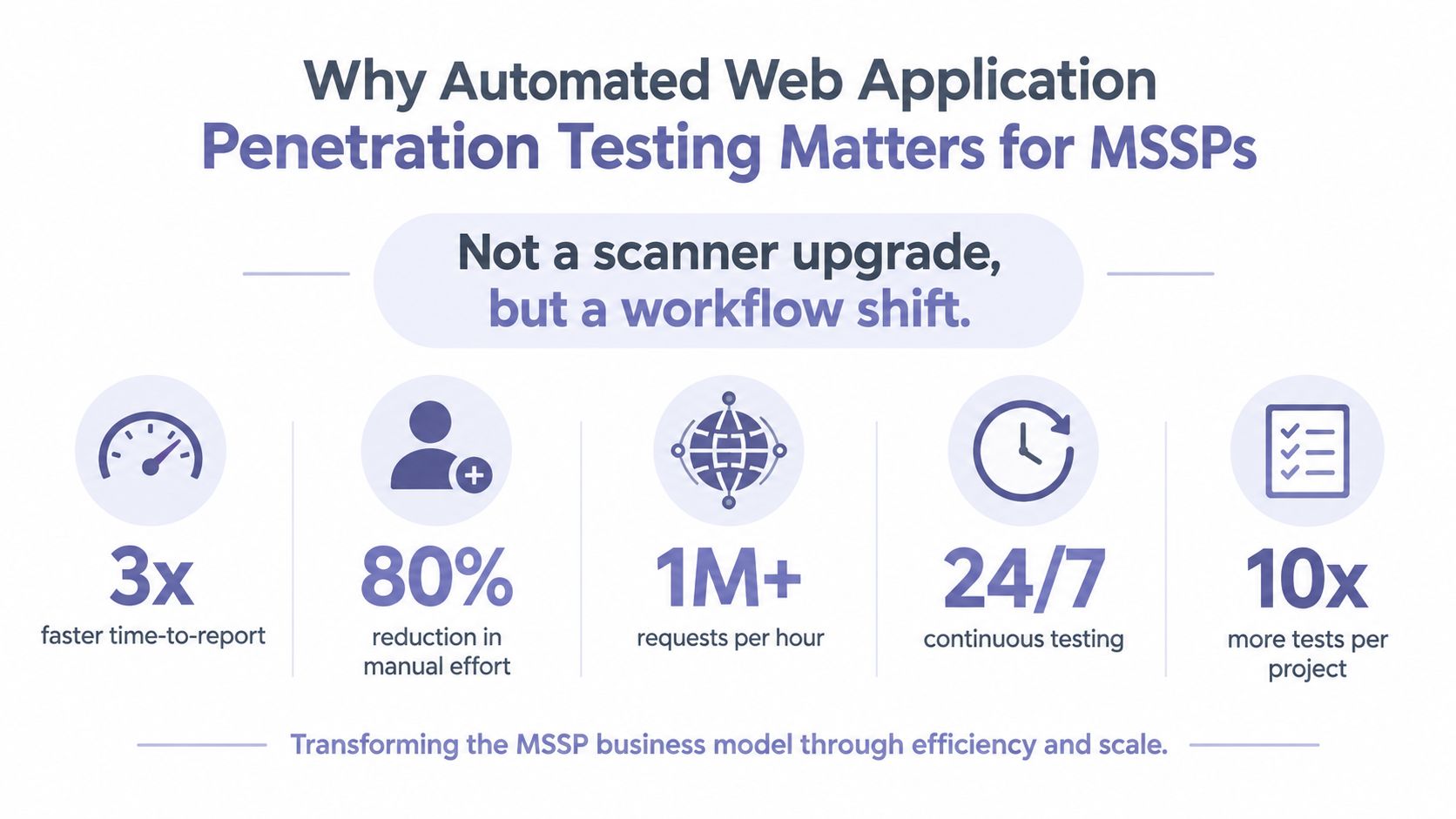
An MSSP sells dependable security outcomes, not the number of hours a consultant spends clicking through an application. That makes automation a business-model decision. A repeatable pipeline can support recurring assessments, consistent evidence collection, and multi-tenant delivery without forcing every new customer into a fully manual engagement.
The pressure is practical. Engagement windows keep shrinking, clients increasingly want continuous testing instead of quarterly PDF delivery, and senior application testers remain too valuable to spend their days repeating endpoint discovery or rerunning identical regression checks. A machine can work across tenants overnight. A senior tester should be reviewing the few findings where context changes the risk.
The market evidence reinforces why providers are investing here. The same penetration testing market analysis identifies web applications as the largest segment because web-based services continue to expand and attackers continue to target them with advanced techniques. For an MSSP, that creates a large recurring workload with a clear opportunity to standardize execution.
The commercial split
Automation handles breadth:
- Asset coverage: Discover domains, routes, parameters, API endpoints, technologies, and exposed functionality consistently.
- Repeatability: Rerun the same policy after a release, configuration change, or remediation cycle.
- Evidence collection: Capture requests, responses, screenshots, and reproduction data while the finding is active.
- Portfolio scale: Apply isolated profiles and routing rules across multiple customer environments.
Human expertise handles depth. A senior consultant decides whether a valid user can cross a tenant boundary, whether a payment workflow can be abused, whether an authentication edge case creates a realistic takeover path, and whether a finding matters to the customer's business.
MSSP rule: Automate the work that produces coverage. Protect senior hours for the work that produces judgment.
The strongest operating model isn't “fully autonomous pentesting.” It's selective automation with explicit escalation. That model gives providers more testing capacity while preserving the human validation that makes a report defensible.
How the Automated Pentest Workflow Actually Runs
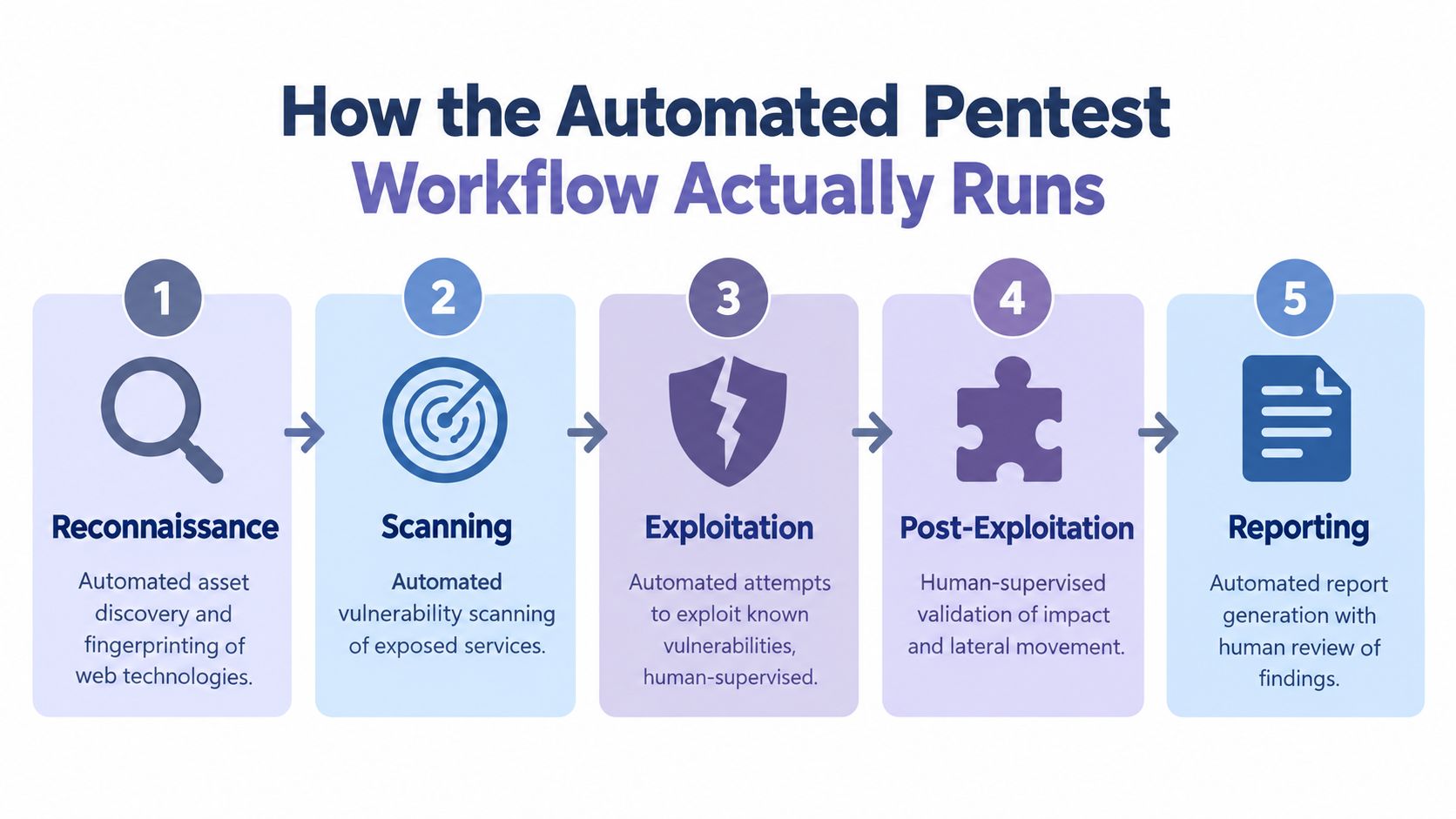
A production workflow should follow a recognizable penetration testing methodology, with clear boundaries around authorization, safety, and human approval. The machine can execute much of the repeatable work, but it shouldn't decide scope or launch aggressive activity against an unapproved target.
1. Reconnaissance
The pipeline starts with asset discovery and attack-surface mapping. Crawlers collect reachable pages and application paths. Wordlists probe for unlinked content. Technology fingerprinting identifies frameworks, servers, authentication patterns, and API styles. API specifications, when supplied, expand coverage beyond what a public crawler can see.
Machines can run this stage unattended across approved tenants, including overnight discovery and recurring surface comparison. Human supervision remains mandatory during scope confirmation. A discovered hostname isn't automatically authorized, and an endpoint exposed through a third-party integration may require separate approval.
2. Scanning
A DAST engine interacts with the live application from the outside, without requiring source-code access. OpenText's DAST guidance describes this black-box approach as injecting real attacks into running web applications and APIs to identify runtime weaknesses such as authentication problems and misconfiguration.
Policy templates should be tuned to the technology, authentication state, API type, and agreed safety limits. Scanners can run common checks for injection, insecure headers, exposed files, weak session behavior, and misconfiguration, but the output is still a candidate finding.
For teams assessing regulated environments, a focused resource on ethical hacking for HIPAA compliance can help connect application testing with compliance expectations. It shouldn't replace technical scoping, test authorization, or evidence requirements.
3. Exploitation
The exploitation layer turns detection into controlled proof. Payload libraries attempt safe validation, credential checks run against sandbox accounts, and exploit chains can connect related weaknesses. This stage must be constrained by rate limits, test data, non-destructive payloads, and explicit rules for sensitive actions.
Human approval is required for anything that could alter production data, affect availability, trigger real transactions, or cross an agreed boundary. Machines can execute low-risk proof-of-concept checks unattended, but a tester owns the decision to escalate.
4. Verification
Verification is where the workflow earns trust. The system deduplicates related alerts, correlates requests and responses, and attempts to confirm exploitability. A human tester then reviews high-impact results, reproduces them safely, and determines whether the evidence supports a client-facing claim.
5. Reporting
The final layer assembles evidence, severity, affected components, remediation guidance, and compliance mappings. Automation improves consistency, but a consultant should review the narrative, business impact, scope statement, and executive summary before delivery.
Automated vs Manual Web Application Penetration Testing
Automated and manual testing answer different questions. Automation asks whether repeatable probes can identify suspicious behavior across a broad surface. Manual testing asks what an attacker can accomplish when application behavior, user roles, workflow state, and business context interact.
| Dimension | Automated | Manual |
|---|---|---|
| Coverage | Broad, repeatable testing across many endpoints and tenants | Selective depth across high-risk functionality |
| Speed | Fast execution and easy regression runs | Slower, because the tester investigates context |
| Consistency | Stable policies and comparable results between runs | Quality depends on tester method and experience |
| Cost model | Lower marginal cost per recurring scan or candidate finding | Higher cost per engagement, with greater analytical value |
| Best use | Reconnaissance, common vulnerability checks, baselines, and release regression | Business logic, authorization chains, race conditions, and impact validation |
| Primary risk | False positives and shallow interpretation | Limited capacity and variable coverage |
Automation wins when the task is repetitive. It can crawl, fuzz, compare, and rerun the same controls without fatigue. That makes it valuable for large portfolios and applications that change frequently.
Manual testing wins when the flaw depends on intent or sequence. A tester may need to create accounts with different roles, manipulate state across several requests, understand how pricing or approval works, or combine a seemingly minor issue with an access-control weakness. An automated system may flag an isolated symptom and miss the actual attack path.
The web application penetration testing resource from ThreatExploit reflects the operational distinction providers need to preserve. Scanning can identify possible weaknesses, but a credible penetration test must connect findings to exploitability and impact.
The right comparison isn't machine versus human. It's repeatable breadth versus contextual judgment.
My recommendation is firm. Automate reconnaissance, scanning, regression, endpoint comparison, and evidence collection. Reserve human hours for business-logic testing, exploitation validation, chained authorization analysis, remediation advice, and the conversations that justify premium consulting rates.
The Toolchain That Powers Automated Web App Pentesting
An automated pentest is a layered system, not a single product. Providers get better results when each component has a defined job and the orchestration layer records what happened, why it happened, and which evidence supports the result.
| Layer | Function | Example Categories |
|---|---|---|
| Asset discovery | Finds domains, routes, technologies, and exposed services | Crawlers, subdomain discovery, technology fingerprinting |
| Attack-surface mapping | Organizes pages, parameters, APIs, roles, and entry points | Site maps, endpoint inventories, API importers |
| DAST | Sends runtime probes to identify web and API weaknesses | Black-box scanners, policy-driven vulnerability engines |
| Fuzzing | Exercises parameters, paths, headers, and input variations | Directory fuzzers, parameter discovery, payload mutators |
| API testing | Tests REST and GraphQL behavior, schemas, authorization, and input handling | API-aware scanners, schema importers, request replay tools |
| Authentication coverage | Maintains sessions and tests role-specific behavior | Credential brokers, token handlers, authenticated crawlers |
| Exploitation | Performs controlled proof-of-concept validation | Payload libraries, exploit modules, sandboxed test actions |
| Verification | Correlates, deduplicates, reproduces, and grades findings | Evidence validators, response analyzers, finding correlation |
| Reporting | Produces technical and executive deliverables | PDF and JSON reporting, CVSS and CWE mapping, compliance exports |
| Orchestration | Chains the run and manages tenant isolation | Job schedulers, workflow engines, secrets management |
DAST sits at the center because it observes the application while it runs. It can expose runtime behavior that static analysis won't see, especially around authentication, session state, configuration, and API responses. It also creates the raw material for deeper testing, including requests that a human consultant can replay and modify.
Authentication-aware scanning deserves special attention. An unauthenticated crawler may see the login page and public content while missing administrative workflows, customer records, billing operations, or tenant-specific APIs. Use separate test accounts and role-aware profiles, then compare what each identity can access.
The orchestration layer is the differentiator. A scanner that produces alerts in isolation creates another queue. A coordinated pipeline can discover an endpoint, test it with the correct session, attempt a safe exploit, collect evidence, suppress duplicates, and route the result to the right reviewer. Threat intelligence feeds should keep detection logic current against emerging CVEs in 2026, but signatures alone won't solve business-logic analysis or post-exploitation judgment.
Plugging Automated Pentesting Into CI/CD Pipelines
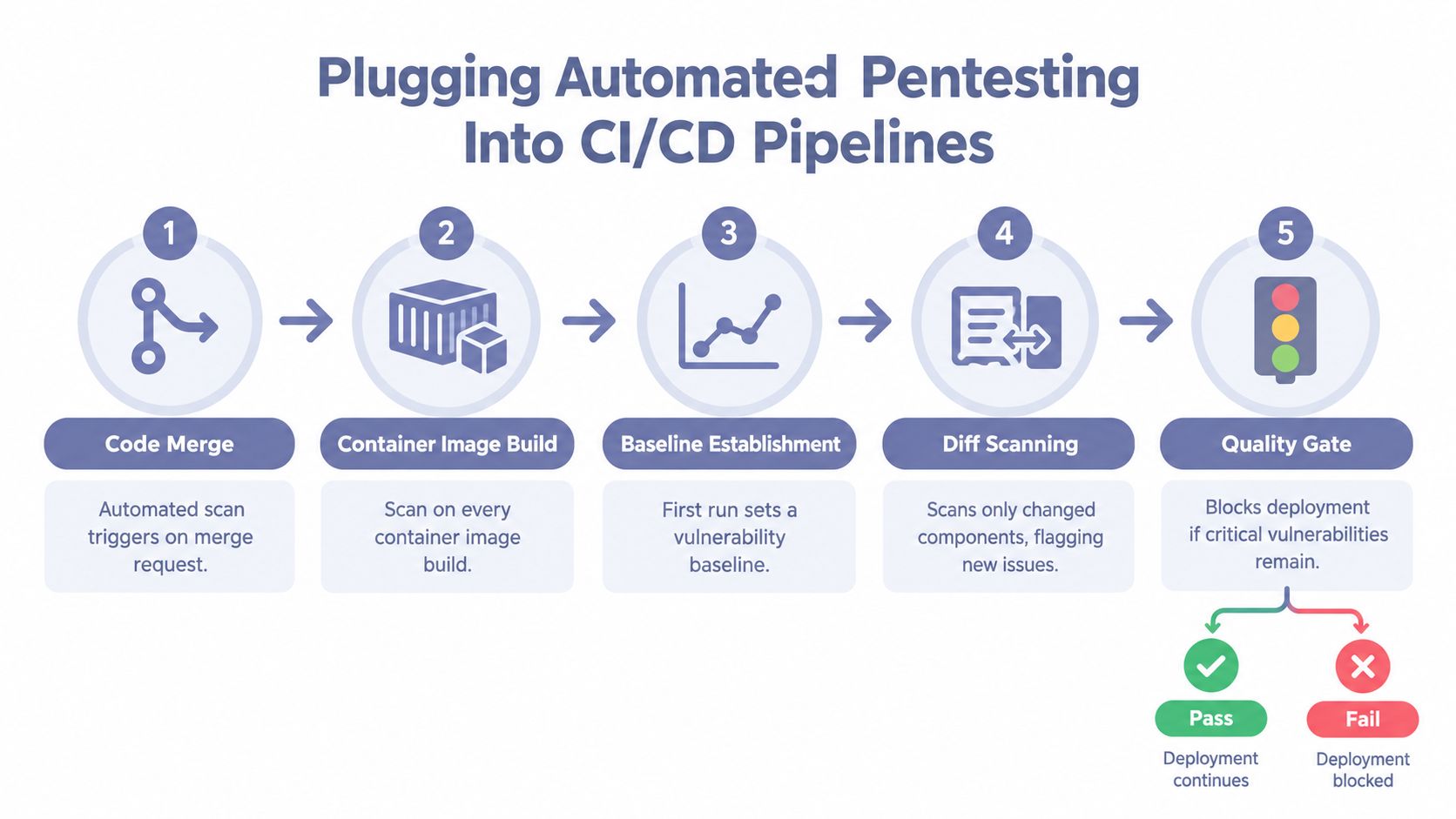
CI/CD integration works when the scan behaves like a quality check, not an unpredictable security ambush. Start at the points where code merges and container images ship, then define what the pipeline should observe, compare, and block.
Establish a trustworthy baseline
The first run should inventory the application and record accepted findings, known exceptions, tested routes, authentication coverage, and scan limitations. Don't fail every build because the baseline contains unresolved issues. Use the initial result to separate inherited risk from newly introduced risk.
Subsequent runs should perform diff scanning. Compare changed components, routes, APIs, and findings against the established baseline. The purpose isn't to rescan blindly. It's to identify new issues and meaningful changes in existing risk.
A practical gate sequence looks like this:
- Merge request scan: Run a focused profile against the changed application surface. Treat results as advisory while teams tune authentication and noise controls.
- Container build scan: Test the image and its exposed application behavior before deployment.
- Nightly scan: Run a broader authenticated profile against a controlled environment.
- Release gate: Block deployment when findings exceed the agreed severity policy.
- Retest trigger: Rerun affected checks after remediation and attach fresh evidence to the ticket.
Use severity gates carefully. Blocking every candidate finding trains developers to ignore the system. Advisory output is appropriate during early merge checks. Release branches should apply stricter blocking rules for confirmed high-risk findings, with documented exceptions owned by a named security or engineering decision-maker.
Operate safely across tenants
An MSSP can expose a shared scanning service to multiple customer pipelines, but the underlying controls must remain tenant-specific:
- Per-tenant credentials: Use separate authentication tokens and test accounts. Never share customer secrets across profiles.
- Isolated scan policies: Keep scope, rate limits, excluded routes, and destructive-action rules distinct for every customer.
- Client-owned routing: Send findings into the customer's ticketing or workflow system with tenant-specific metadata.
- Controlled test data: Provision synthetic records and sandbox transactions so scans don't expose production information.
- Audit-ready records: Preserve authorization, timestamps, policy versions, evidence, and reviewer decisions.
A focused guide to continuous integration in agile security workflows is useful when aligning these gates with development processes.
The maturity gap is still material. Recent coverage of web application security testing in 2026 reports that only 29% of organizations automated 70% or more of security testing, while 52% followed through with CI-integrated automated security testing. Those figures point to an implementation problem, not a lack of scanning tools. Start with two pipelines, tune the workflow, and expand only after developers trust the signal.
Where Automation Breaks and Verification Saves the Report
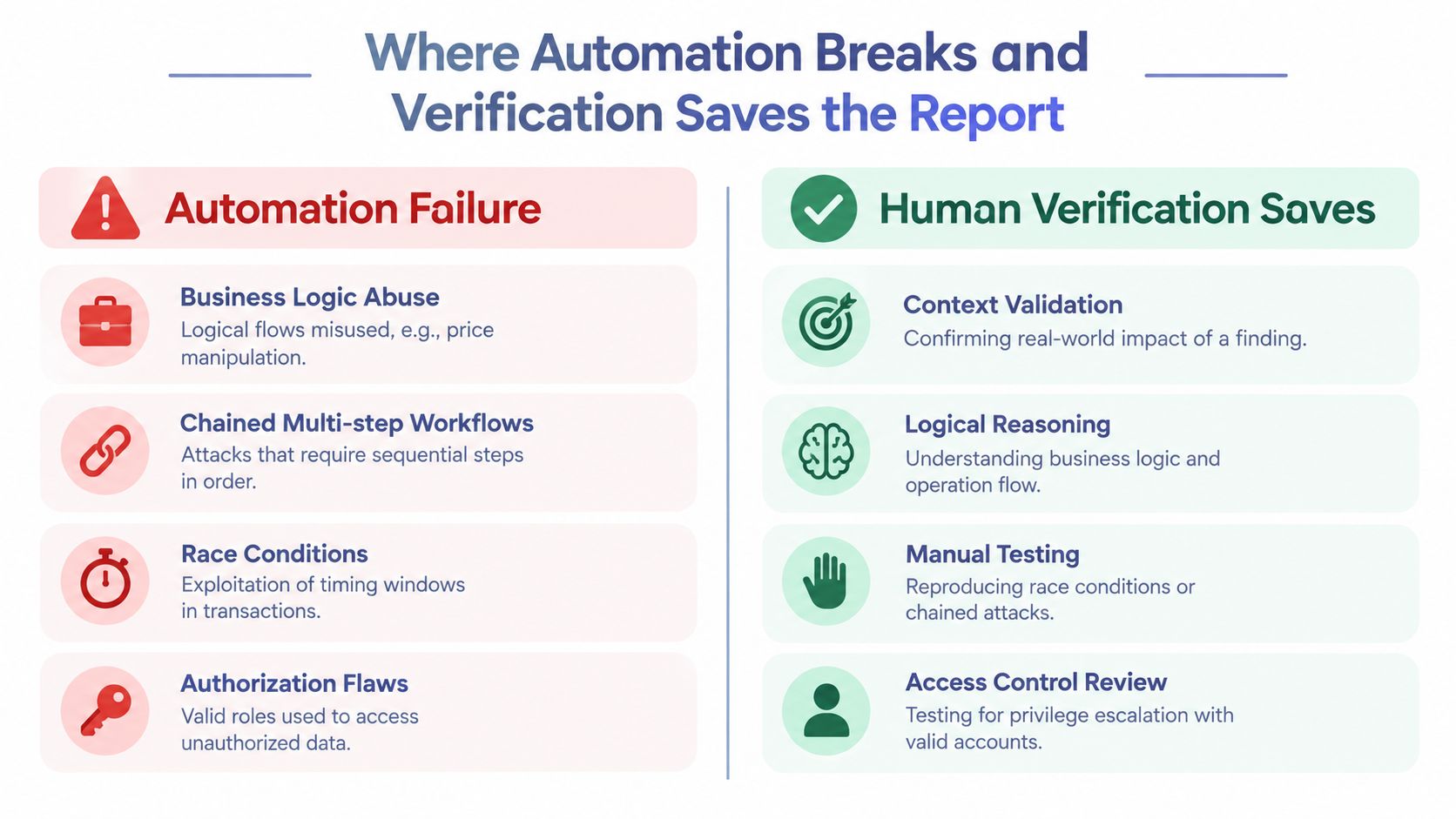
Alert volume does not measure pentest quality. A useful report explains the exploit path, proves that the issue is reproducible, shows business impact, and gives the client enough evidence to assign a fix. Automation supplies repeatable coverage at MSSP scale. Senior testers should spend their time validating the cases that pattern matching cannot resolve.
The attack classes that resist pattern matching
Business logic abuse can use a valid, authenticated, correctly formatted request. The flaw is the outcome the application permits, such as changing a price, skipping an approval, reusing a workflow token, or performing an operation out of sequence.
Chained workflows create another gap. An attack may combine account registration, invitation acceptance, role modification, export generation, and API reuse. A scanner evaluating each request independently can miss the relationship between those steps.
Race conditions require timing and state analysis. Authorization failures can involve a valid role used in the wrong context, such as retrieving another tenant's data through a predictable object reference. These cases require reasoning about what the user is allowed to do, not just whether the server returns a response.
Verification is the product
In one academic comparison across three test applications, a BurpSuite-based scan produced false positives for reflected XSS-style findings at 10% on DVWA, 33% on WackoPicko, and 0% on UVVU. The proposed automated framework reported 0% false positives in that experiment. The results appear in the published comparison of automated verification approaches, illustrating why validation matters more than raw alert volume. The small sample does not establish performance across every application.
A separate comparison of automated penetration testing tools defines false positives as vulnerabilities reported as present when they are not. For a practical guide to filtering scan noise, see how to reduce false positives in automated testing. Every incorrect finding consumes analyst time, creates friction with engineering, and weakens the client's confidence in later reports.
Human reviewers should:
- Reproduce the issue: Confirm the behavior safely with the intended test identity.
- Remove noise: Check whether a control, encoding behavior, or application state invalidates the alert.
- Assess impact: Connect technical access to data exposure, privilege change, fraud potential, or tenant isolation risk.
- Review chains: Test whether separate weaknesses combine into a more serious outcome.
- Write the explanation: Describe the attack path and remediation in language developers and executives can use.
A verified finding with clear impact is worth more than a long list of unproven alerts.
AWS guidance on WAF testing makes the same operational point from a defensive-control perspective. AWS recommends logging, alerting, and regular review of blocked traffic because legitimate requests can be blocked incorrectly. MSSPs should apply that discipline to pentest output. Verification protects the report, the customer relationship, and the senior headcount reserved for difficult decisions.
A Recommended Workflow for MSSPs and Security Providers
Run automation as a managed service, not as an unattended scan button. The production workflow should create a predictable queue, define escalation ownership, and make remediation verification part of the recurring service.
The operating cadence
Use autonomous breadth scans weekly or per release, depending on how quickly the application changes and how much disruption the customer permits. Every confirmed high-severity finding should reach a senior tester for verification within four business hours. That service-level target is an operating recommendation, not a claim about industry performance.
A reliable queue looks like this:
- Authorize and scope: Confirm target ownership, approved routes, test accounts, prohibited actions, and escalation contacts.
- Run breadth coverage: Execute discovery, authenticated scanning, API checks, regression tests, and baseline comparison.
- Triage centrally: Deduplicate findings and route candidate high-impact issues to senior consultants.
- Validate safely: Reproduce the exploit, test impact, and document evidence without damaging customer data.
- Map the outcome: Align confirmed issues with relevant PCI DSS 4.0, SOC 2, and ISO 27001 control families when those frameworks are in scope.
- Deliver and brief: Produce technical evidence, remediation guidance, and a client-facing risk narrative.
- Retest closure: Run a full-suite retest after remediation closes, not just a narrow check that assumes the fix worked.
ThreatExploit AI can fit into the automated portion of that queue by handling reconnaissance, exploitation workflows, evidence collection, and draft report generation across web applications, including REST and GraphQL APIs. Its platform also supports compliance-mapped reporting and multi-tenant provider operations, so an MSSP can evaluate it alongside other orchestrated toolchains rather than treating it as a substitute for consultant review.
Build the service around accountability
Refresh customer-facing dashboards on a one-week cadence so clients can see current exposure, open remediation work, verified findings, and retest status. Produce a monthly executive summary that aggregates residual risk across the MSSP portfolio, but keep tenant data isolated and preserve customer-specific context.
Assign named owners for three decisions:
- Technical verification: A senior tester decides whether the evidence supports the finding.
- Remediation coordination: A delivery owner tracks fixes, exceptions, and retest scope.
- Client communication: A consultant explains business impact and answers questions without hiding behind automated severity labels.
Your tactical decision this week should be narrow. Pick two enterprise tenants, enable continuous scanning with CI/CD gates, and assign ownership for verification and client communication before you scale the model further.
ThreatExploit AI provides security service providers with an automated penetration testing platform for reconnaissance, exploitation, verification, evidence collection, and compliance-mapped reporting across web applications and APIs. Visit ThreatExploit AI to evaluate how its multi-tenant workflows and CI/CD integrations can expand automated coverage while keeping senior consultants responsible for judgment and client trust.